Making Driftworks: the devlog
Every version of a game I'm making with Claude, from the first message to version 32: my notes in my own words, what changed, and screenshots.
I'm designing this game and playtesting it as it's built; Claude, Anthropic's AI, writes all the code. Each entry below is one round: my notes in my own words (trimmed, never reworded), what Claude proposed or built, and what changed. Times are New York time. Every screenshot is from the newest build (build 22), using game states the test player reached in Chapters 1 and 2; design talk has none because nothing was built yet. Build numbers count each playable build in order; Driftworks had no version numbers of its own.
- From Jumpgate to a station and a frigateOct 16, 10:34 am to 12:07 pm
- The first playableOct 16, 12:18 pm to 12:30 pm
- Controls like an RTSOct 16, 12:56 pm to 1:05 pm
- Building the stationOct 16, 1:19 pm to 1:47 pm
- Belts, jobs and recipesOct 16, 1:56 pm to 2:21 pm
- Docking and the copper lineOct 16, 2:21 pm to 4:30 pm
- ComputeOct 16, 6:10 pm to 7:40 pm
From Jumpgate to a station and a frigate
Oct 16, 10:34 am to 12:07 pm
On Jumpgate's second day Kraig rethought the moving factory: one home that stays put and a frigate that flies out to mine and haul. Claude asked one question at a time and he answered, about a minute an answer. Then it became its own game, Driftworks.
designmilestone
One home that stays put, and a frigate that goes out
“I'm also reconsidering like just the flying moving factory idea. And I'm starting to think we need to like actually start building more buildings and production chains. And to do that, it kind of needs like one home. So I'm thinking... we have like a very slow, stationary, drifting station. And that's where we build factory. And the player can control like a mining vessel that goes out with drones, has storage, has battery. So it has like a limited range. And that's what goes out and collects resources and hauls it back to the station for processing.”Kraig, 10:34 am
“And you can take the mining, like, we'll just call it like the frigate. So like the Rocinante out to do mining. You can take the Rossi out to attack. You can use it to defend if enemies are incoming. You can use it to advance the storyline, to like research debris and stuff. But it's like a hauler. So it goes and gets ice, it goes and gets ore... the factory will like have stores. You dump the ores and then it starts working and you go get more, or you stay and like repair the ship or refuel it or recharge the batteries as it's docked. And then once the ship is like good to go for another sortie, you figure out where you want to go based on your next bottleneck. I really like this idea. I think this is like the V2 of Jump Ship.”Kraig, 10:34 am
Claude: Midway through Jumpgate's second day, Kraig questioned its moving factory. Claude rewrote the plan around two bodies. A slow, drifting station is home, where the factory runs nonstop on power and does research with compute. A frigate with a hold, a battery and drones flies out for ore and ice and hauls it back. The loop: the factory hits a bottleneck, you pick where to go, mine, haul home, dock and recharge, and the factory runs on what you brought.
- A stationary station that drifts and never flies: the factory, its stores, power and research.
- A frigate you fly: a hauler with drones, a hold and a battery, so its range is limited.
- Every sortie is chosen by the factory's next bottleneck.
- Later the frigate also defends, attacks and investigates wrecks for the story.
design
Start small, and steer by questions
“we can head to like question mode to like smooth it out and steer it... obviously we'd start simple, start small, the least, just the simplest version of everything. So like the frigate is just like a tiny, like a drone, like a small, tiny drone probably to start. And well, we should just start as like a small ship. Also, I think we're AI. I don't know. Maybe we're a person. But like we can control everything with like God view with AI. But like our person is in our frigate. And our frigate is what has to survive... for mining, it should be like shooting the rock to break it apart so it's small enough to like grab. And I don't know if there's like a little drone that comes out of the main ship to like grab material to add it to the inventory, the hull... just start asking me questions one at a time so we can steer this.”Kraig, 10:39 am
Claude: Claude switched to asking one question at a time. What was settled from this first message: start as a small ship, with someone aboard the frigate, which has to survive. You see and control everything from a god view through the AI. Mining shoots a rock apart into pieces small enough to grab.
- Start with the simplest version of everything.
- Someone is aboard the frigate, and the frigate must survive.
- A god view: you control everything through the AI.
- Mining breaks a rock into pieces small enough to grab.
design
The first answers: tap to fly, a drone to fetch, a derelict to wake
Claude: Kraig's first answers in question mode. You fly by tapping where to go, and the frigate flies itself there. A little drone launches from the frigate from day one, grabs each broken piece and brings it to the hold. Home at the start is a derelict to restore, powered by burning ore, and the first goal is waking it.
- Tap where to go; the frigate turns, burns and brakes on its own.
- A small drone fetches each broken-off piece into the hold.
- Home is a derelict; its burner runs on ore; the first goal is waking it.
design
Eight more answers about the station and the frigate
Claude: The rest of question mode, one answer a minute. Items move between station modules on belts you lay, and layout and throughput are the puzzle. Modules go anywhere, with belts as free lines. The frigate's range is its battery alone, recharged from the station's power. Run it flat far out and it drifts home with nothing lost but time. The station keeps working while you're away. Ore lies in rings: iron close, copper farther, ice and silicon farther still. The derelict starts with a dead burner and a broken smelter. Research costs data cards the factory makes, plus compute.
- Belts between station modules, laid by you.
- Free placement for now, belts as free lines.
- Battery is the frigate's only limit; a flat battery means drifting home, not losing anything.
- The station runs on while you're out.
- Ore in rings outward from the station.
- Research needs data cards from the factory plus compute; later research needs every earlier card.
milestone
A new game: Driftworks
“let's rename it, rebrand it, because this is like a new game, new build, separate from Jump. It's taking some elements, but it's like a new game.”Kraig, 12:07 pm
Claude: V2 was set to be built fresh in its own folder with its own play link, borrowing Jumpgate's outline art, sound, playtest recorder and recipes, while Jumpgate stays playable as it is. Minutes later Kraig made it a separate game and picked the name Driftworks.
- A fresh build in its own folder, on its own play link.
- Jumpgate stays as it is.
- The name: Driftworks.
The first playable
Oct 16, 12:18 pm to 12:30 pm · v1–v2
Ten minutes after the rename: fly out, mine iron, haul it home and wake a derelict's broken burner and smelter. One more pass added a reason to spend iron and a long trip to copper.
v1milestone
Build 1: wake the derelict
Claude: The first playable build, about ten minutes after the rename. The derelict sits at the centre, drifting very slowly, with a broken burner and a broken smelter on its hull. You fly the frigate out to the iron rocks close by. Its laser breaks off pieces and the drone carries them aboard. Back home it docks, unloads and recharges, and the ore repairs the burner and then the smelter. Six steps end with 10 iron made and the derelict awake. A test player runs the whole loop in about seven minutes.
- The station: stores, a battery and two broken modules.
- The frigate: a 30-ore hold, a 100 battery, a mining laser and one drone.
- Seven iron rocks close in, three copper rocks past 2 km.
- A six-step tutorial, from the first flight to 10 iron.
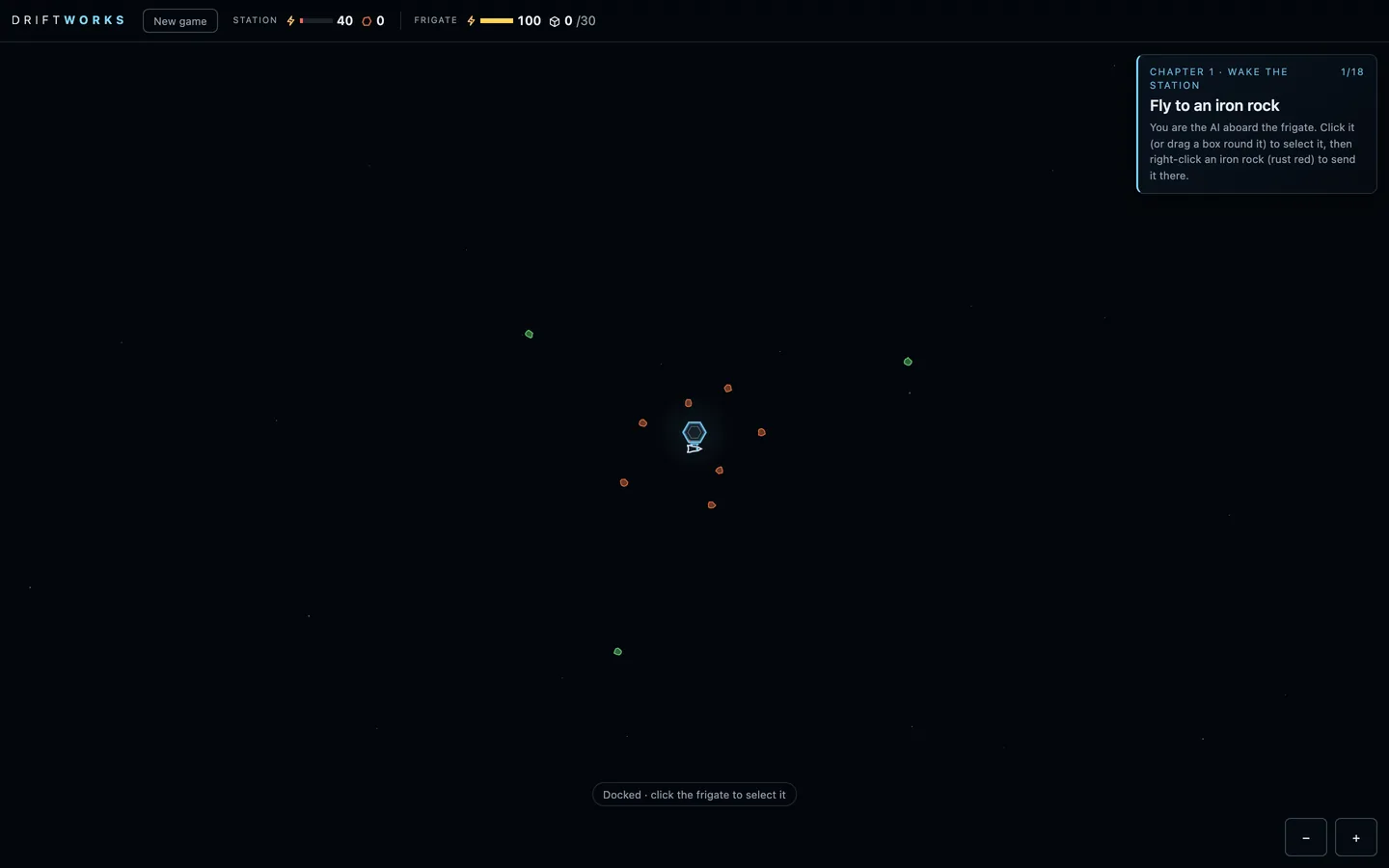 (open full size)
The rings, zoomed out: iron close to home, copper far out. Published as “Build 1”
v2mechanic
A second chapter: spend iron, then go far
“one more pass and build”Kraig, 12:30 pm
Claude: Iron now buys something. 10 iron fits a bigger hold, 15 iron a bigger battery, and the bigger battery is what reaches the copper field. The new goal is to bring home 10 copper ore. Nine objectives in about twelve minutes for the test player.
- A bigger hold for 10 iron (30 to 50 ore).
- A bigger battery for 15 iron (100 to 180), enough for copper.
- Bring home 10 copper ore from the far field.
Controls like an RTS
Oct 16, 12:56 pm to 1:05 pm · v3–v7
From the first playtest on the Mac: a free camera, no menu, select-and-right-click orders, a harvester loop and pause or four times speed.
v3controls
A free camera, like a god
“we need to change the camera and, like, controls. So, like, you play the game moving the camera around with AWDS, and you can, there's no, like, home or frigate view. You can just control the frigate as, like, a movable character. And you can control anything, anywhere. So it's like a remote view, omniscient god mode.”Kraig, 12:56 pm
Claude: From his first playtest on the Mac. The camera no longer follows anything: WASD or the arrow keys pan it at a steady speed, and scroll or pinch zooms. The Home and Frigate buttons are gone. You command the frigate from wherever you happen to be looking.
- WASD and arrows pan; the camera never follows.
- No Home or Frigate views.
- Orders work from anywhere on the map.
v4controls
No menu, just the game
“let's just get rid of the menu at the front. I just want to play test like a super quick, simple version of this game. So just strip away everything we don't need. And I'm trying to start a new game and I can't.”Kraig, 12:58 pm
Claude: The start card and the menu came out. What's left is one New game button, tapped twice to confirm. It hadn't worked before because the play page blocks pop-up confirm dialogs.
- No start card and no menu.
- New game works: tap it twice.
v5controls
Controls like a real-time strategy game
“controlling the frigate should be like controlling a unit in any other real-time strategy game. The like two-finger alt click should be to send it to a new location on the map, and then just single clicking on the map should deselect the unit. I don't like that you just single tap and it goes... And I should be able to click and drag a box to select the unit instead of just clicking it.”Kraig, 1:00 pm
Claude: Click the frigate, or drag a box round it, to select it, and a green ring shows. Right-click (two-finger click) a rock, the station or empty space to send it there, with a green ping where it's going. Clicking empty space deselects. On a phone, a finger drag still pans.
- Click or box-select the frigate.
- Right-click to send it.
- Click empty space to deselect.
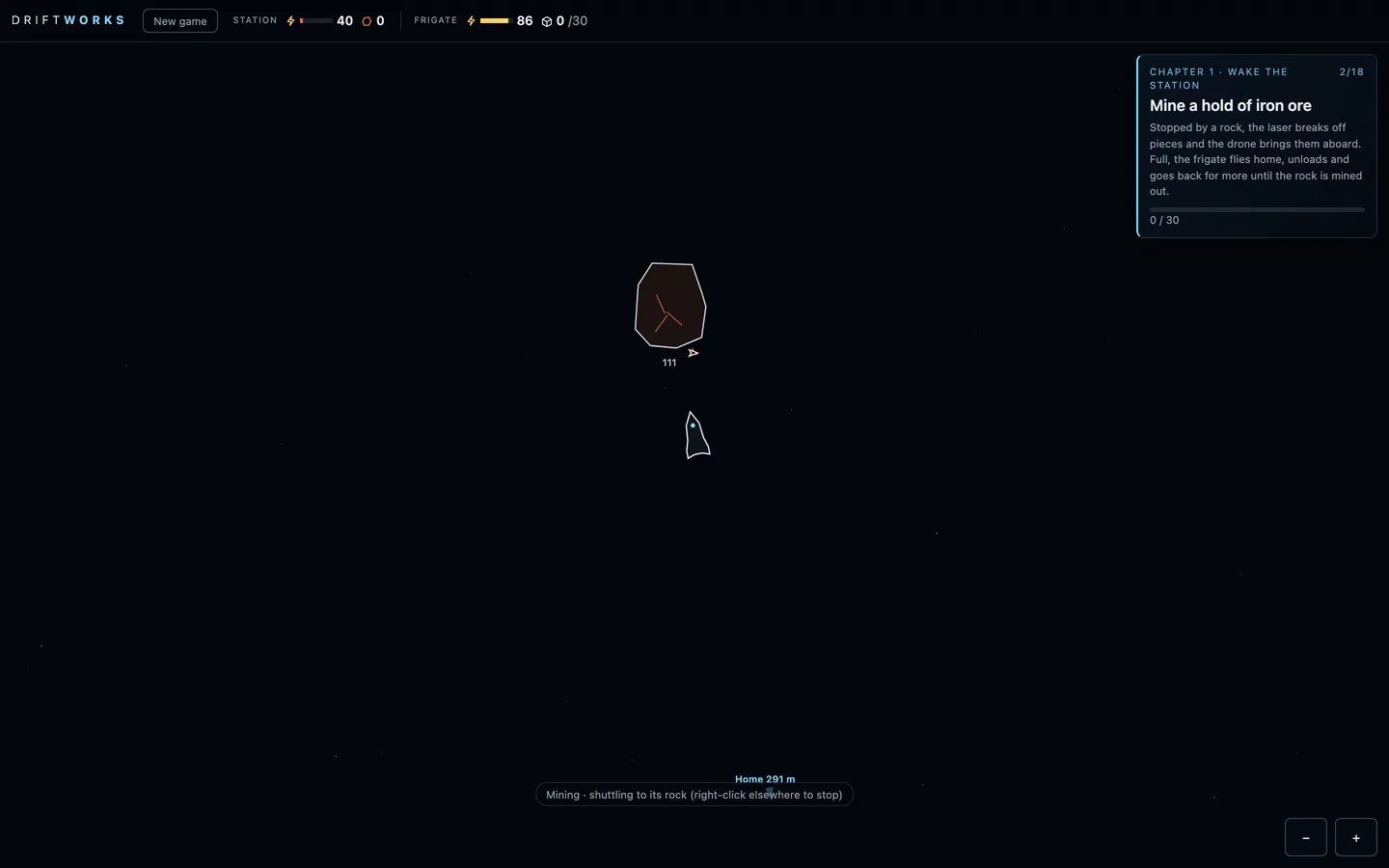 (open full size)
Sent to the first rock: the laser breaks off pieces and the drone fetches them. v6mechanic
A harvester loop, like an RTS worker
“do another 10-minute pass of improvements”Kraig, 1:04 pm
Claude: Claude's own pass. Right-click a rock and the frigate keeps hauling that ore. When it's full, the rock runs out or the battery gets low, it flies home, unloads, charges and goes back. Any other order stops it, and Esc deselects.
- A rock order keeps the frigate hauling until another order.
- Esc deselects.
v7controls
Pause, and four times speed
“The speed overclock for time should just be pause 1 and 4. So hitting F just goes between 4 times and 1 time speed. And I think spacebar has to be pause for the game. I don't think we need, like, where's the ship?”Kraig, 1:05 pm
Claude: F toggles between normal speed and four times, Space pauses and resumes, and a badge shows PAUSED or x4. The camera still pans while paused. The key that jumped to the ship is gone.
- F: x1 or x4.
- Space: pause.
- No jump-to-ship key.
Building the station
Oct 16, 1:19 pm to 1:47 pm · v8–v13
Start with just the core and build every module yourself. Moving modules, a locked hex grid round the dock, belts as hexes tried, and a frigate that shuttles to one rock.
v8mechanicmilestone
Start with nothing but the core
“maybe you should just build the most simple version and then we'll do another playtest. So instead of repairing the two modules attached to the core, we should just start with the core. And I think the ship should be able to dock only with the core. For now. And I also want it to dock sideways, not engines in. And instead of repairing the modules, we're going to build the modules and also build the connector. Belt.”Kraig, 1:19 pm
Claude: The derelict's broken modules are gone. You start with the core alone, and the frigate docks side-on against a clamp on its lower face. You place a burner and a smelter yourself, and the drone builds them from the stores while you're docked. Then you join them to the core with belts. Modules only work through their belts.
- Start with the core only.
- The frigate docks sideways.
- Build modules instead of repairing them, and link them with belts.
v9design
Auto-hauling becomes an upgrade, later
“I like that you have to control the ship at the beginning and like being able to enable auto mining mode going back and forth between asteroids and the base should be something that we upgrade later. So let's just take that out for now.”Kraig, 1:22 pm
Claude: The harvester loop came out. A rock order mines until the hold is full and stops, and you fly every trip home yourself. The loop stays in the code for a future frigate upgrade.
- You fly every trip.
- Auto-hauling is saved for a later upgrade.
v10mechanic
Move modules, and watch the belts stretch
“you should be able to click on any module, and then in the menu there's a move option, and then you can like click and drag it... as you move it, you should see the belts update in real time. And if they get too far, the belts just like detach and the smelter is like separate.”Kraig, 1:26 pm
Claude: A module's panel has Move. The module follows the mouse, and its belts redraw as it goes. Past 120 m they turn red and dashed, and when you drop it there they detach, sending what was on them back to where it came from.
- Move any module.
- Belts stretch live and detach past 120 m.
v11designmechanic
A locked hex grid, and the core becomes the dock
“I'm wondering if the station should keep like a locked hex grid... just placeholder hexes so that we can space things out a little bit. But like organizing the hex grid for logistics is like a huge puzzle. And eventually you'll need to like be shifting and moving, selecting entire sections, pushing it out from the dock. I want to change the core to dock. So the AI is the frigate... the frigate is fine. And then the little drone is what comes out... the module within the hex is like a little smaller than the grid space, so that we can have some space between the modules to show the connections.”Kraig, 1:32 pm
Claude: Free placement gave way to a grid. Modules snap to hex cells around the dock, each a little smaller than its cell, leaving gaps for the belts. Free cells show as faint placeholder hexes. The core is called the dock everywhere, and the AI is now the frigate.
- A flat-top hex grid round the dock.
- Modules sit a little smaller than their cells, with room for belts.
- The core is the dock; you are the AI aboard the frigate.
- Later: shift whole sections out from the dock.
v12mechanic
Belts as hexes, tried
“What if the belts were hexes themselves? And eventually we would have like mergers or splitters as hexes as well.”Kraig, 1:43 pm
“let's make this update with the hex grid. And also you can just hide the hex grid during normal play. Only show it when I'm like building a new hex or moving a hex. Also, let's add a constructor module so that we can attach the smelter to a constructor to make iron plates.”Kraig, 1:43 pm
Claude: Belts became hex cells of their own that you lay in lines, and buildings that touch hand items to each other. You can only build next to something already there. The grid only shows while you're building or moving. A third module arrived: the constructor, which turns 2 iron into an iron plate.
- Belts as hexes you lay in lines; touching buildings pass items.
- Build next to the station only.
- The grid shows only while building.
- The constructor: iron into iron plates.
v13mechanic
Shuttle to one rock, then wait
“We should make it so the frigate continues to go back and forth to the one asteroid that it starts. But once it fully depletes that asteroid, it just waits at the dock.”Kraig, 1:47 pm
Claude: A rock order shuttles: full, the frigate flies home, unloads, charges and goes back to that same rock. When the rock is mined out it comes home and waits, and it never picks a new rock by itself.
- A rock order shuttles to that one rock.
- Mined out, the frigate waits docked.
Belts, jobs and recipes
Oct 16, 1:56 pm to 2:21 pm · v14–v21
Belt hexes came out within the quarter hour. Belts now run between touching modules, one per side, and every module starts empty. You pick its job and recipe, and each belt's item, from only the options that are real. Chapter 1 was refreshed, and music and a design pass arrived.
v14mechanic
Belts between modules, and modules you give a job
“we're not going to do belts as hexes. That's a bad idea. Mergers and splitters eventually will probably be hexes, like modules. But belts need to be built between modules. And they have to all start neutral. So you have to pick the direction, and you have to pick what item it can transport. You can only have two belts per side of the hex. And for each module, it starts neutral, and you need to pick what it does.”Kraig, 1:56 pm
Claude: Belt hexes came out about fifteen minutes after they went in. There is one kind of module now, built neutral, and you give it a job: burner, smelter or constructor. Belts join touching buildings across a shared side. You set each belt's direction and the item it carries, and nothing moves on a belt until both are set.
- Belt hexes removed.
- One kind of module; you pick its job.
- Belts across a shared side, set by hand.
- Items move only on belts.
v15mechanic
One belt per side, R to flip
“belts should start going one direction, but neutral. And you can, when you have it selected, you can just press R to rotate it between the two different options. And the game, for 8 out of 13... it shouldn't be bringing 10 iron to the dock. It should just be produce 10 iron... The smelter has like a small inventory... So the inventory is 10, I guess... And also, let's just do one belt per side, right?”Kraig, 2:04 pm
Claude: A new belt points from the building you had selected to the one you right-clicked, and R flips it. Each side takes one belt. The eighth goal is now to make 10 iron, kept in the smelter's own store of 10. Upgrades cost plates.
- Belts start pointing one way; R flips them.
- One belt per side.
- Make 10 iron instead of bringing it to the dock; modules keep 10 of what they make.
v16mechanic
Belts carry what their ends imply
“belts coming from the smelter only have one option, and that's whatever the smelter is making. So like the game should be smart about like asking you what you want to do with the belt based on what it's connect to and what it can do... So there's no selecting, and that's just what it does, right?”Kraig, 2:07 pm
Claude: No item picking: out of a module, a belt carries what that module makes, and out of the dock it carries what the receiving module uses. When nothing fits, the belt panel says why.
- Belts set their item from their ends.
- When nothing fits, the panel explains.
v17designart
Chapter 1, refreshed, with tube belts
“Let's just do like a refresh of the entire tutorial, chapter one, with the objectives adjusted to what we have now, because we're not bringing materials back to the dock... there's just one belt per side, and it should just be in the middle. Let's make them a little like tubes so that we can see the materials trading between them.”Kraig, 2:10 pm
Claude: Chapter 1, Wake the station, is 14 goals now. Fly out, mine and unload. Build a burner and belt ore to it, then power the station. Build a smelter and make 10 iron, then a constructor and 5 plates. Fit the bigger hold and battery, and bring home copper. Nothing has to go back to the dock: upgrades take plates from any module's store. Belts are tubes across the middle of each side, with the items visible moving inside.
- A 14-goal Chapter 1 for the game as it is now.
- Upgrades take from any module's store.
- Belts drawn as tubes with the items inside.
v18soundart
Music and a design pass
“take this time to do a quick design overhaul improvement, as well as add the background music. You can like copy it from the previous games we've made pretty much.”Kraig, 2:14 pm
Claude: Jumpgate's generative score came over. A low drone, pads and cold glass notes; a long sortie lifts it, docking resolves it, and finishing a chapter plays a small triumph. M mutes it. The design pass added a DRIFTWORKS wordmark and a glowing dock. Modules are tinted by job (burner amber, smelter steel, constructor blue) with a meter of what they hold. The goal card got a progress bar, and the panels got calmer.
- Background music, from Jumpgate's score.
- A wordmark, a glowing dock and modules tinted by job.
- A clearer goal card, panels and toasts.
v19mechanic
You always pick a belt's item
“I just attached the dock to my burner and it auto picked ore... What I meant is that when I connect a belt between two modules and there's only like one resource, that should be the only option that's available for me to click. I should always choose what resource or item goes through the belt.”Kraig, 2:16 pm
Claude: Every new belt carries nothing until you pick its item. The belt panel offers only what fits its ends, so there's often a single button, and you still click it. If nothing fits, it says why.
- New belts start empty.
- Only the items that fit are offered, even when that's one.
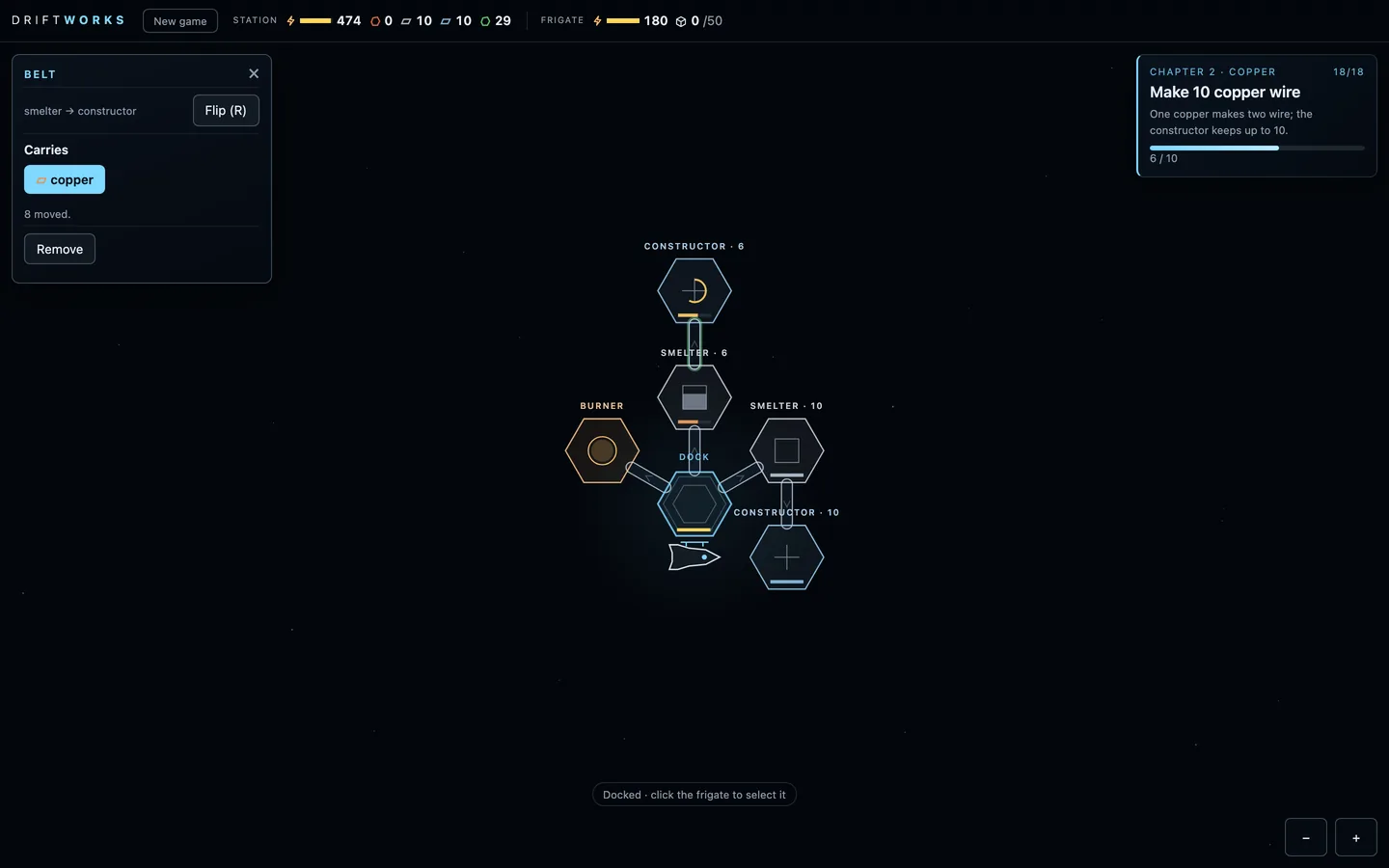 (open full size)
A belt's panel: one item fits, and you still pick it. v20mechanic
Belt blueprints that build themselves
“if it places a module ghost blueprint, I should be able to put a ghost belt blueprint as well, and it'll just build it when it can.”Kraig, 2:17 pm
Claude: A new belt is always a blueprint first, a faint dashed outline, and it can go to or from a module that is itself still a blueprint. It builds itself once both ends are built and the dock can spare the ore. Jobs and belt items can be picked ahead of time, so a whole layout can be planned before it exists.
- Belt blueprints, built when they can be.
- Jobs and items can be set before anything is built.
v21mechanicdesign
Modules start empty, and only real options show
“the constructor automatically just picked iron plates to make out of iron. I should have to pick that. It should just start a neutral empty... we just want to limit what the player sees and what they can choose based on like their actual options.”Kraig, 2:21 pm
Claude: After its job, a module needs a recipe you pick: what the burner burns, what the smelter makes, what the constructor builds. Nothing runs until then. A job or recipe is only offered once you've actually had its input, so the choices grow as you do.
- A recipe to pick after the job.
- Only options you can really use are shown.
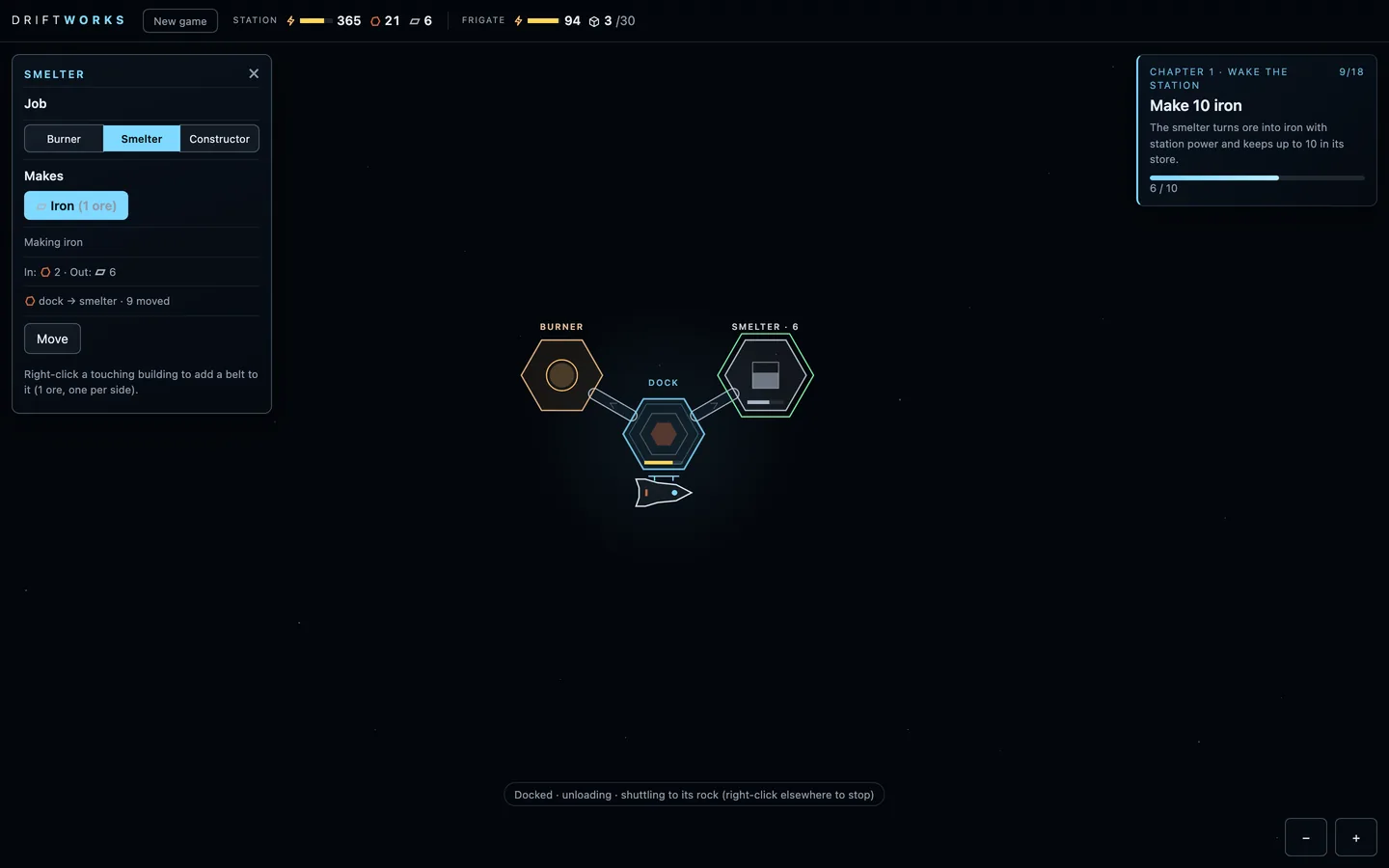 (open full size)
A smelter's panel in Chapter 1: iron is the only recipe it can offer yet.
Docking and the copper line
Oct 16, 2:21 pm to 4:30 pm · v21–v30
Thrusters for the fine work so the frigate glides into the dock, and after Kraig finished Chapter 1, a second chapter with a copper smelter and a wire line.
v21mechanicart
Thrusters for the fine work
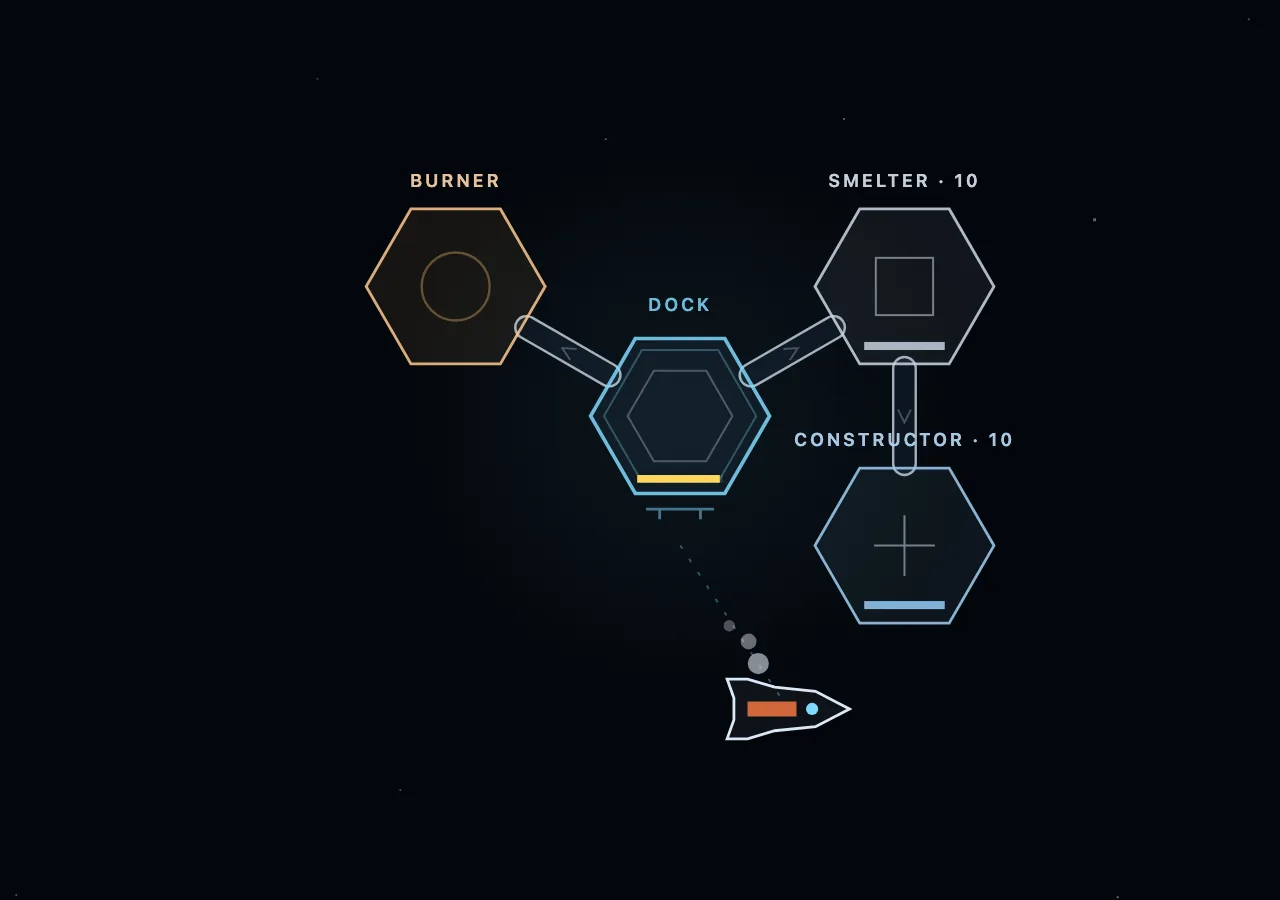
“The engines should light up for the like big movement of the flip and burn, but if it's moving a short distance or just like course correcting, it should have little thruster bursts that are just like light gray... so it can like dock easier... if it's flying into the dock, it should like thrust and turn or rotate so that it just like lands into the dock nicely.”Kraig, 2:21 pm
Claude: The main engine and the flip and burn are only for the long run now, and it brakes early enough to hand over smoothly. The last stretch, short hops and small corrections are on thrusters, light-grey puffs out the side opposite the push. On the way in the frigate turns to its arrival heading: side-on for the dock, nose to the rock for mining. No more overshooting and bouncing, and the trip to the first rock dropped from 46 seconds to about 30.
- Main engine for the long run, thrusters for the last 70 m and small moves.
- Light-grey thruster puffs.
- Turns to its arrival heading: side-on to dock, nose to the rock.
 (open full size)
Coming in to dock on thrusters, side-on. v22milestonemechanic
Chapter 2: copper and wire
“I completed the chapter one. It's fantastic... Let's add on copper smelting, copper bars, or just copper, and wires. So we'll have a smelting and a constructing line for copper as well.”Kraig, 2:23 pm
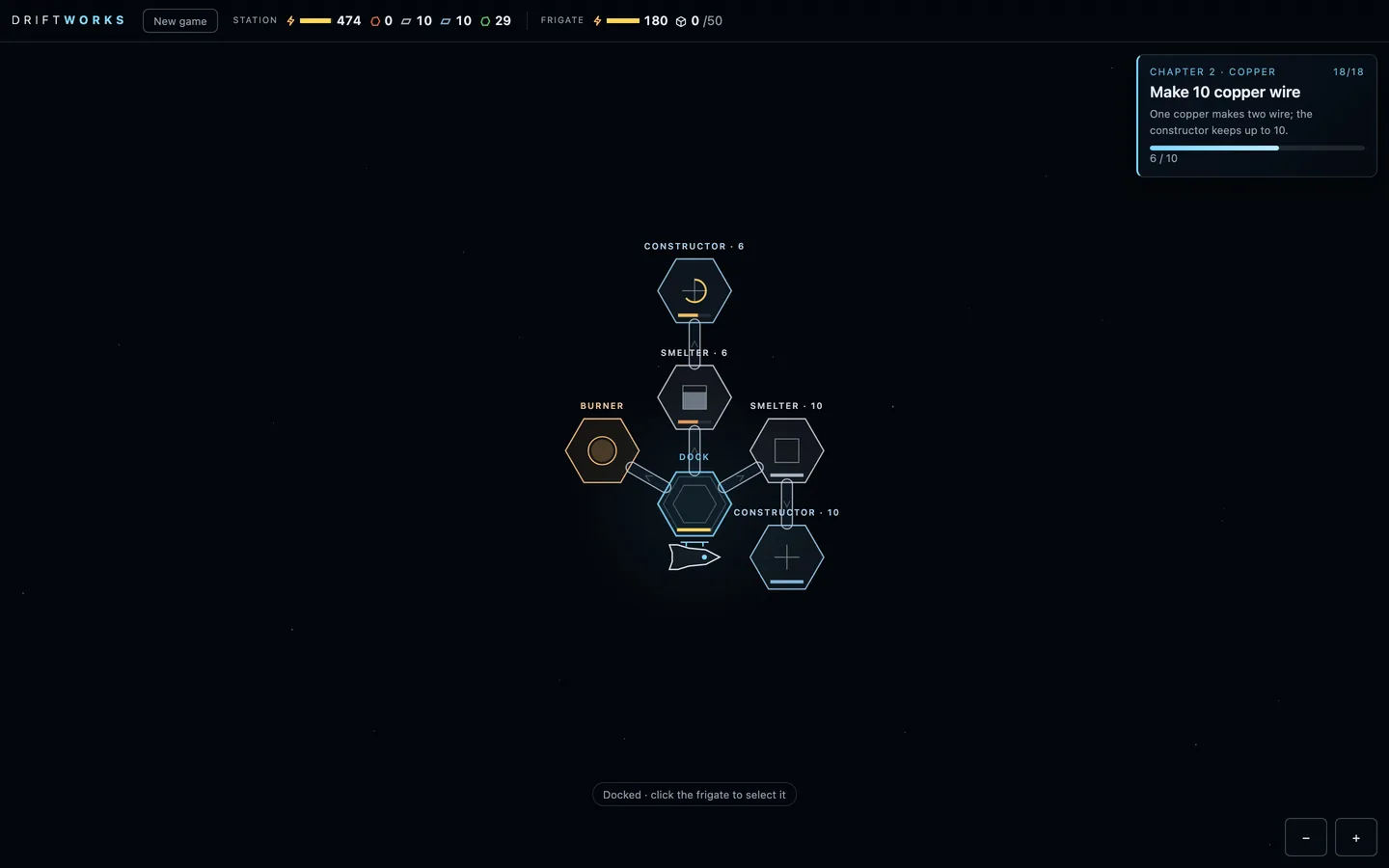
Claude: Kraig finished Chapter 1. Chapter 2, Copper, follows the 10 copper ore you brought home. Build a copper smelter fed by a belt from the dock and make 10 copper. Then build a wire constructor fed from the copper smelter and make 10 copper wire, at two wire per copper. Finishing a chapter plays the small triumph. The test player gets through both chapters in 20 to 24 minutes.
- A copper smelting line and a wire line beside the iron ones.
- A chapter-complete moment.
- Both chapters in about 20 to 24 minutes for the test player.
 (open full size)
Chapter 2's two lines: iron to plates on the right, copper to wire above. 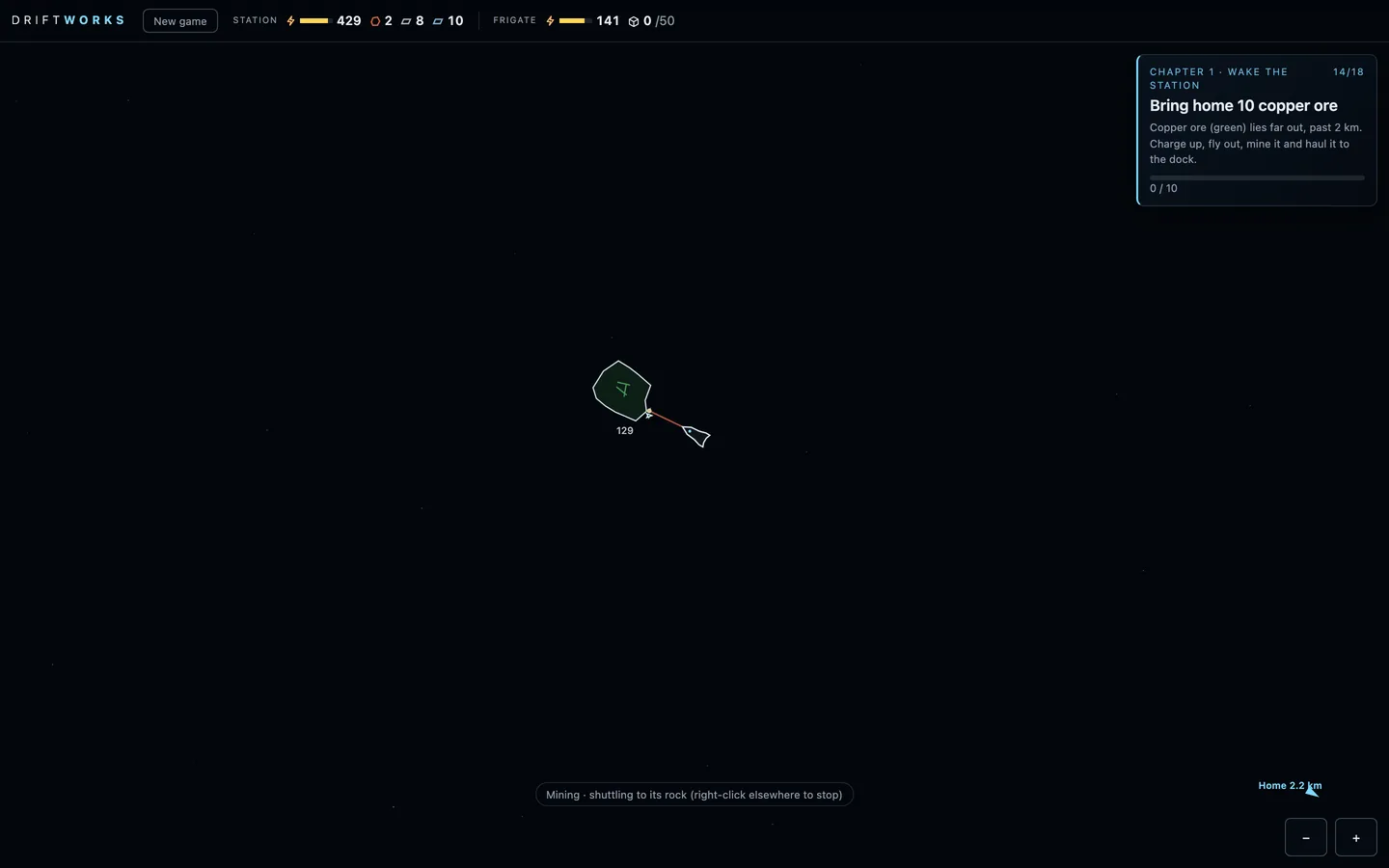 (open full size)
Mining copper 2.2 km from home. Published as “Build 22”
v23–v30playtestbalance
Fixes from the Chapter 1 playtest
“My dock ran out of power and my frigate ran out of power... I can't build the burner... a stalemate... We just should have more power... a lot of players would do this.”Kraig, 4:05 pm
“On auto mode, it shouldn't keep going if it knows it's going to fail.”Kraig, 4:20 pm
“The frigate battery should last just enough to go out to get the iron and back... a bigger battery for chapter 2... copper and back. That teaches you.”Kraig, 4:25 pm
Claude: Kraig's playtest found a trap: with both batteries flat at the dock, nothing could be built and nothing could fly. The station now starts with more charge, and the drone's work while docked costs nothing, so the trap can't close. The 'unload at the dock' goal now completes on the first unload. A frigate hauling on its own now waits at the dock until it has charge for the whole round trip, and a manual order warns when the battery looks short. The starting battery reaches the iron field but not copper, so the bigger battery is what opens the copper run. The Rocinante-style frigate drawing also got simpler and smoother.
- No power stalemate: more starting charge, free docked drone work.
- Auto hauling waits for enough charge; manual orders warn.
- The starting battery reaches iron only; the bigger battery opens copper.
Compute
Oct 16, 6:10 pm to 7:40 pm · v31–v32
Sound that follows the camera, a frigate that docks without spinning, and Chapter 3: data cards, compute, heat and radiators, chained burners and the lab.
v31mechanicsound
Sound follows the camera, and no last-second spin
“The frigate should just dock at its destination, like in the same orientation that it's approaching... there's no up or down in space, so any direction is fine, even for the dock back at the station.”Kraig, 5:40 pm
“We shouldn't hear the frigate mining if we're zoomed in on the station. Like, where our camera is should dictate what we hear.”Kraig, 5:55 pm
Claude: Mining, pickups, docking and repairs now play at full volume while they're on screen and fade out over about one more screen beyond the edge, so the camera decides what you hear. The frigate keeps the heading it arrives on, at rocks and at the dock, and rests a little further out when it docks nose-first so the hull clears the core. A test checks it doesn't turn in the final stretch. This version also brought the first Chapter 3, with data cards and research.
- World sounds fade with distance from the camera.
- The frigate arrives and docks on its own heading, no final spin.
- A first Chapter 3 with data cards and a data center.
v32milestonemechanic
Chapter 3: Compute
“For the data centers, it should make heat... a number that builds up in the data center... heat is just like different, it just needs to connect to the radiator.”Kraig, 6:20 pm
“I'd like to daisy chain the burners together. Like, should we be able to transfer ore through a burner to another burner? I think we should.”Kraig, 6:30 pm
“We feed those cards to the data center. But those cards are used by the data center to make compute, which then we can spend for research.”Kraig, 6:45 pm
“At the end of chapter 3, you build a lab after the data center. And it can be anywhere on the station... all it does is burn compute.”Kraig, 7:05 pm
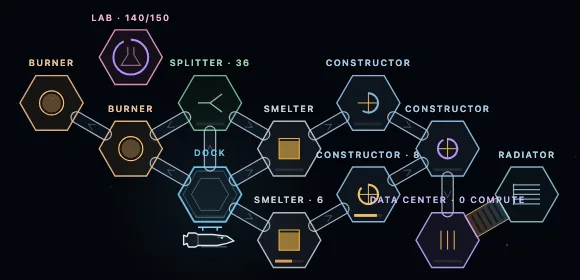
Claude: Chapter 3 became a chapter about compute. A constructor makes data cards from plates and wire, and a data center turns them into compute, which it stores up to a limit. When it's full it stops taking cards, so the card line backs up like any other. Converting makes heat. A radiator touching the data center connects itself with a short heat pipe and keeps it cool; without one, compute slows to a crawl. The data center draws so much power that one burner can't keep up and everything slows evenly, so the fix is a second burner fed with ore through the first. The chapter ends when you build a lab, which spends compute on research from anywhere on the station. Compute is stored by tier, ready for harder cards later. New modules now cost plates and wire, and modules show just an icon and a status light when you zoom out. A quiet factory hum plays when you look at the station.
- Data cards, compute stored in each data center, heat and automatic radiator links.
- Burners pass ore to each other; power shortages slow everything evenly.
- The lab and the research card; Chapter 3 ends at the lab.
- Modules cost what you make; zoomed-out icons and status lights; a factory hum.
 (open full size)
Chapter 3's station: cards into a data center, its radiator joined by a heat pipe, and a lab. 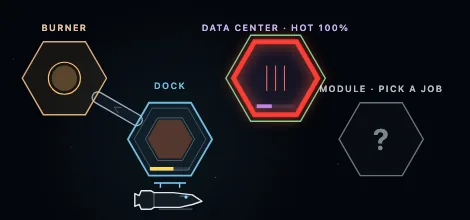 (open full size)
No radiator touching it: the data center runs hot and compute slows.
Play the build
It runs in the browser on a computer, with a trackpad or mouse and a keyboard. It's an early build: it changes every day and saves can reset between versions. Tell me what felt good and what didn't.