
System · August 2026
KraigOS
- KraigOS
- AI
- Devlog
KraigOS is the small system that runs the work around my films: one database in my own Cloudflare account, a handful of tools, and Claude doing the work while I talk in plain words. It plans and posts my clips, files my email, keeps my calendar and tells me what needs me.
I started it on August 25, 2026. My part of anything shrinks to a yes, a no, a pick, or a step only I can do. The full build log is the timeline below.
Highlights
Milestone
How it works
The parts, the routines and what runs when, on its own page.
Story · October 13, 2026
I built my own operating system for my creator business
KraigOS is the small system Claude and I built to run my one-person business: one database I own, a few tools and one AI routine. Why, and what it does.
Read it all 6 min
I make long films about hiking alone, about 250 of them on YouTube, and hiking guides to the routes in them. It's a one-person business, and like most one-person businesses, the work around the work is the part that never ends: email from brands and platforms, deadlines, files, posts on five platforms, numbers to check.
For the last seven weeks I've been building something to carry that load. I call it KraigOS.
The problem it solves
In late September I put my real problem into words: "we have a lot of good ideas and also just like a lot of work, but none of it ever really just like happens." Ideas were never short. Shipping was.
So the rule for everything since: shrink my part. If Claude can do it, Claude does it. What's left for me is a yes, a no, a pick, or a step only I can do, like filming, recording my voice or signing.
What KraigOS is
KraigOS is one database and a handful of tools that Claude uses while I talk in plain language. There are no commands to learn. I just say what I want in a Claude chat, and Claude answers from the records, my email, my calendar and my Drive.
It holds facts, not rules: my projects and to-dos, deals, people, dates and decisions, the catalog of all 249 of my films, a ledger of every short and where it's posted, and a searchable log of 48,800 moments from my films. Everything else has one home too: conversations in Gmail, dates in Google Calendar, files in Google Drive, code on GitHub.
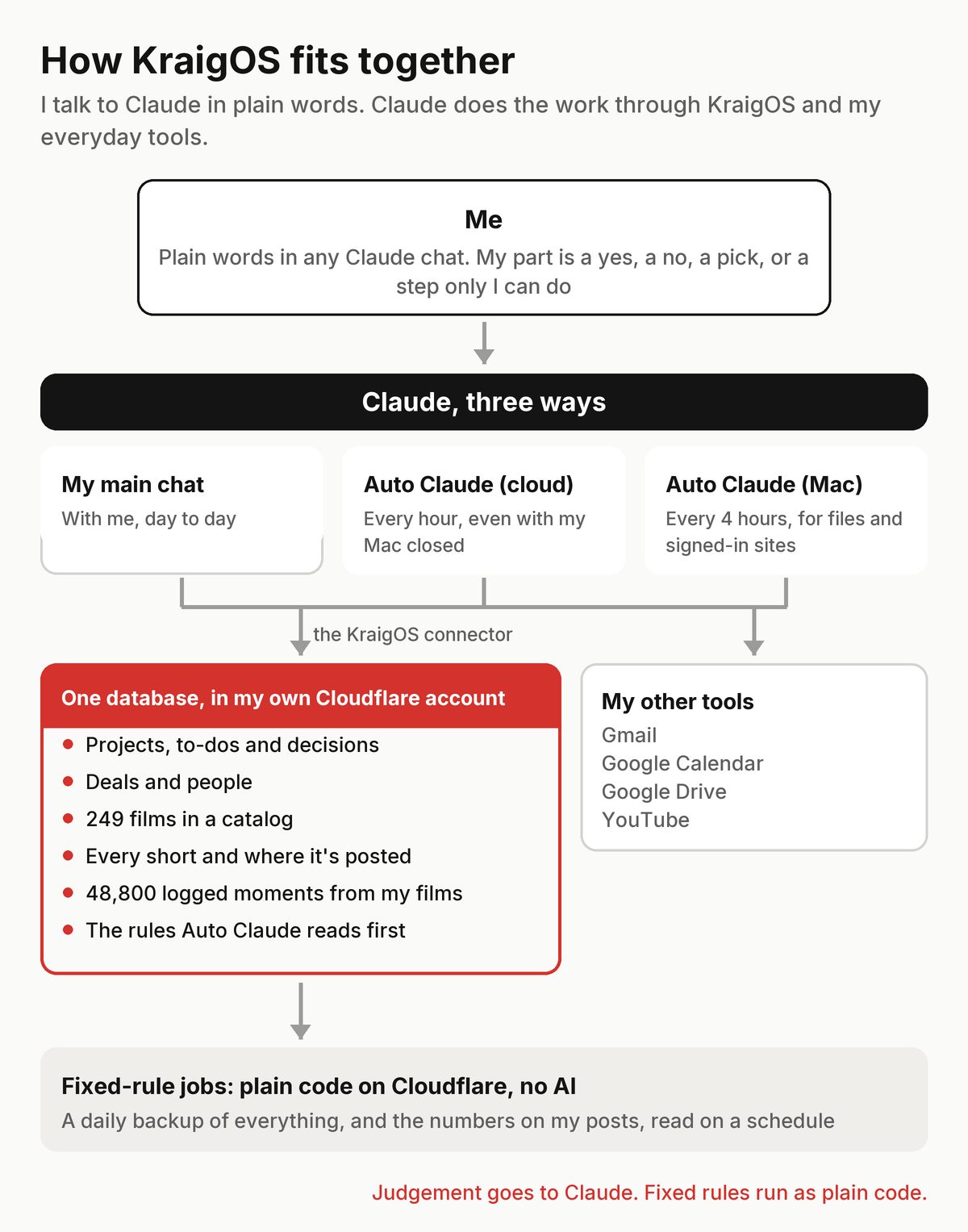
The one-page rulebook I signed off on sums up the point: keep one trustworthy record of my work, kept current without effort on my part, so nothing depends on my memory or Claude's.
Why my own, and why Cloudflare
I want my data in an account I own. On September 25 I said it plainly: "i'd like to keep all my data in cloudflare if possible." So the database lives in my own Cloudflare account, not inside someone else's app. It works with my Mac closed, it's backed up every day, and the code is saved to a private GitHub repo on every change.
How it grew
Before Claude, I spent the summer learning to build with OpenAI's Codex: almost 20 billion tokens and a 55-day streak (my Codex profile). The first KraigOS came out of that on August 25, and it kept growing, to about 77,000 lines of code: email pipelines, a cloud runtime, tools for a podcast and for X. On September 23 Claude and I replaced all of it with one database and one small program. Its instructions still open with the same line: "KraigOS Lite is deliberately small. Keep it that way."
Then it grew again, carefully. Workers in Cloudflare started sorting my email and keeping my calendar around the clock. From October 1 a Claude task on my Mac worked through a to-do list on its own.
On October 12 I split the work by what it needs. Jobs that follow fixed rules, like the daily backup and reading the numbers on my posts, run as plain code in Cloudflare, with no AI. My words when we planned it: "these are all good, especially if they can be done for free with the cloudworker continously." Anything that needs judgement moved to two Claude routines, which I called Auto Claude. A day later, on October 13, I folded them into one routine that runs every 4 hours on my Mac, overnight too, and dropped the name: it's all KraigOS now. That story is its own article: KraigOS: one AI routine runs my inbox, calendar and files.
What it runs today
Most of my recent articles are really about a piece of KraigOS:
- Email. Every email is read, what it says is saved, and finished threads leave the inbox. Brand pitches become one card with a reply ready. Inbox zero with AI.
- My calendar. Claude manages all of it from the records. I never type in it.
- Films and footage. The catalog of every film, the original files in Drive, and every logged shot searchable. Ten years of YouTube films in Google Drive.
- Shorts. Every short, where it's posted and its numbers on each platform. What 201 Facebook reels taught me.
- Translations. My films' titles and descriptions in six more languages. Translating my YouTube films with AI.
- Guides. Built by Claude from my own films and GPS tracks, and kept up to date. How my hiking guides are made.
- My voice. An AI clone of my voice for narration that stands on its own. How I cloned my voice with AI.
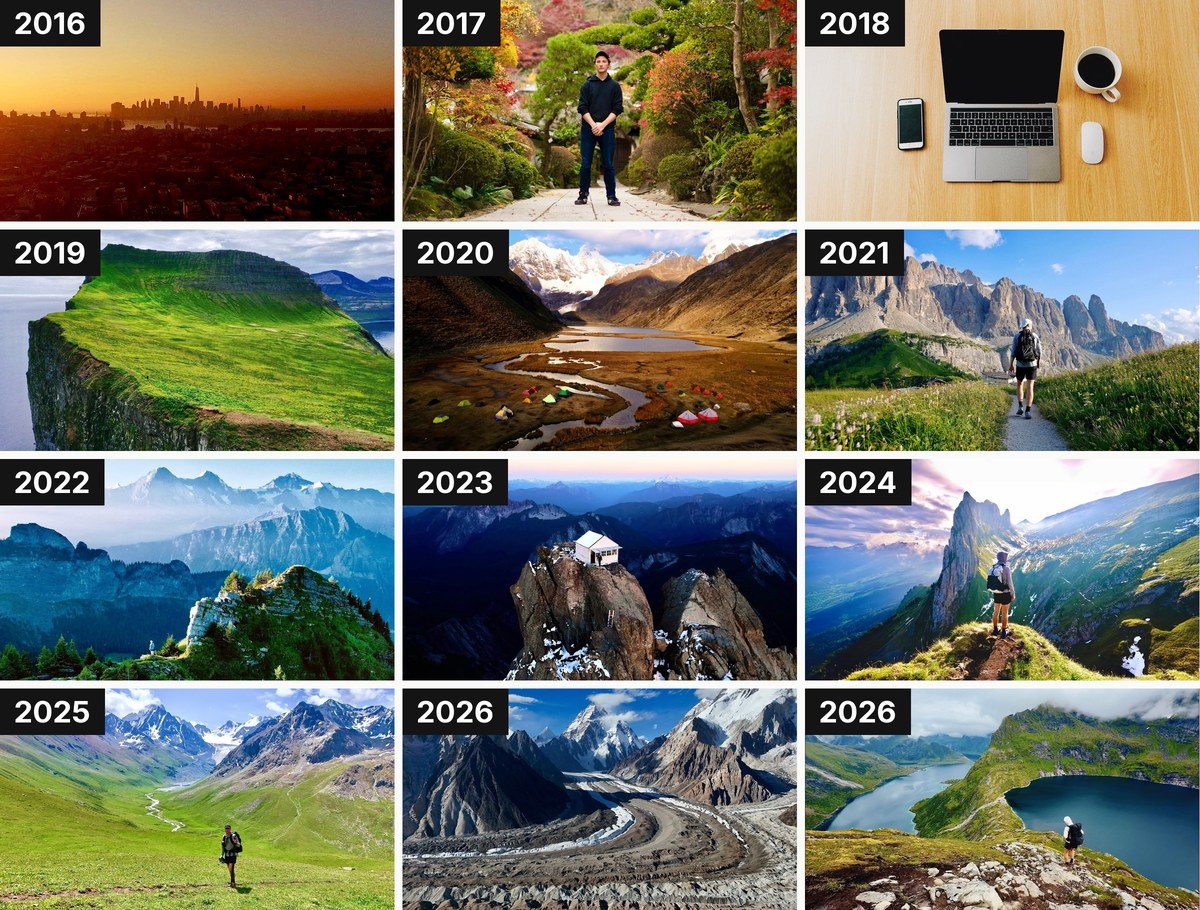
How I use it
I talk to it. When I sit down to work, I say "morning" in a Claude chat: "i also like to say 'morning' when i start my work in claude so that also might be a good time/place to update me and get started". Claude tells me what needs me and walks me through the review list, one question at a time, each with its recommendation.
What it never does
- Nothing goes out without my yes. Sending an email, posting, paying, signing and deploying all wait for me, on the exact thing.
- Nothing is deleted. Claude moves safe copies to the Trash, and I empty it myself.
- No secrets saved. Passwords, codes and keys that show up in email are blanked out before anything is stored.
- Sign-ins are logged first. Any time Claude signs in somewhere or changes an account setting, it writes it down before it acts.
What's next
I said it in the Drive article: "now I feel another shift coming, toward adopting AI and adapting to the changes it brings: KraigOS, and automating just about everything in my media workflow."
So KraigOS gets its own page on this site, kraigadams.com/kraigos, so people can understand, in my words, "what i've built, what i'm using and how they could make their own version and why". It changes as KraigOS changes, and every article about it is listed there. Next for the system itself: each part of the routine's work moves to autopilot once it has earned it, on my yes.
FAQ
What is KraigOS?
My own small operating system for a one-person creator business: one database in my Cloudflare account, a handful of tools, and Claude doing the work while I talk in plain language.
What AI does it use?
Claude, from Anthropic, for almost everything. Google's Gemini wrote the shot logs of my films, and my narration voice is an ElevenLabs clone.
Can I download KraigOS?
No. It's built around my own business and accounts. The KraigOS page explains how to build your own version from the same few pieces.
Does the AI send emails or post for you?
No. Anything sent, posted, paid or signed waits for my yes on the exact thing.
Where is the data kept?
In a database in my own Cloudflare account, backed up every day. Files stay in my Google Drive and code on GitHub.
Story · October 13, 2026
KraigOS: one AI routine runs my inbox, calendar and files
One Claude routine files my email, keeps my calendar and handles my files every 4 hours, and brings me one list to review. How it works, and what day one taught me.
Read it all 10 min
I make long films about hiking alone, about 250 of them on YouTube, and I make hiking guides from them. Around that sits a lot of desk work: email from brands and platforms, a calendar, files spread between my Mac and Google Drive, short videos for every platform. My problem has never been ideas. It's getting things shipped.
So this fall, with Claude, Anthropic's AI model, I've been building KraigOS, a small system of my own that keeps track of every project, deal, film and to-do. The idea is that Claude does the busywork and I make the decisions. On October 12 that took a big step: Claude started doing that work on a schedule, without me prompting it.
Update, October 13. This started as two routines I called Auto Claude, one in the cloud every hour and one on my Mac every 4 hours, and most of this article tells that first day as it happened. A day later I changed two things. I folded the cloud routine into the Mac one: "let's completely fold the AutoClaude cloud into our AutoClaude local and stop using AutoClaude cloud." And I dropped the name: "i renamed auto claude to 'KraigOS'", because, as I put it, "KraigOS is basically a machine version of me." Now one routine runs every 4 hours, overnight too, and does the jobs of both.
What I asked for
That morning I described it in chat like this: "i picture having an 'auto Claude' that runs every hour. it should try to do everything i would be doing and whatever it can. Basically instead of my having to prompt in claude, every hour it tries to be me and get work done better than i even could."
It should start with email, file what each one means, and "if there is a bottleneck or decision i need to make before it proceeds, it should place that in the list".
Before that day, a worker in my Cloudflare account handled email around the clock, and a Claude task on my Mac worked through a to-do list every couple of hours. Both were switched off that morning, and I wanted the new version to start with me reviewing everything: "i want to get back into a review period. i want to review most everything, especially email before you move forward. i want to trust that your next step on auto is actually correct."
How it started: two routines, one list
On day one there were two:
- Auto Claude (cloud) was a Claude routine on my Claude account. It ran every hour from 7am to midnight, plus once at 3am, whether my Mac was open or not. It handled everything that goes through a connector: email, my calendar, the records in KraigOS and brand pitches.
- Auto Claude (Mac) was a scheduled task in the Claude app on my Mac. It ran every 4 hours while the Mac was awake and did what needs files or my signed-in browser: Google Drive, chores on sites I already use, keeping the disk clear, and drafting articles.
Each part of the work belonged to exactly one routine, so they never stepped on each other. I said why I wanted the cloud half: "it would be nice for the cloud session to always be running for situations like when i'm transporting the mac." Since October 13 the Mac routine does both halves' jobs in one run: email, calendar, records and pitches first, then files, Drive and the rest.
Every run starts fresh. Before it does anything, it reads two records in KraigOS: the modes (what it may do on its own) and the lessons (my corrections so far). Then it works, and anything that needs me goes on one review list.
Autopilot, review or paused
Every part of the work has a mode. On autopilot it acts, then lists what it did and how to undo it. In review it proposes, and nothing happens until I say yes. Paused means it does nothing.
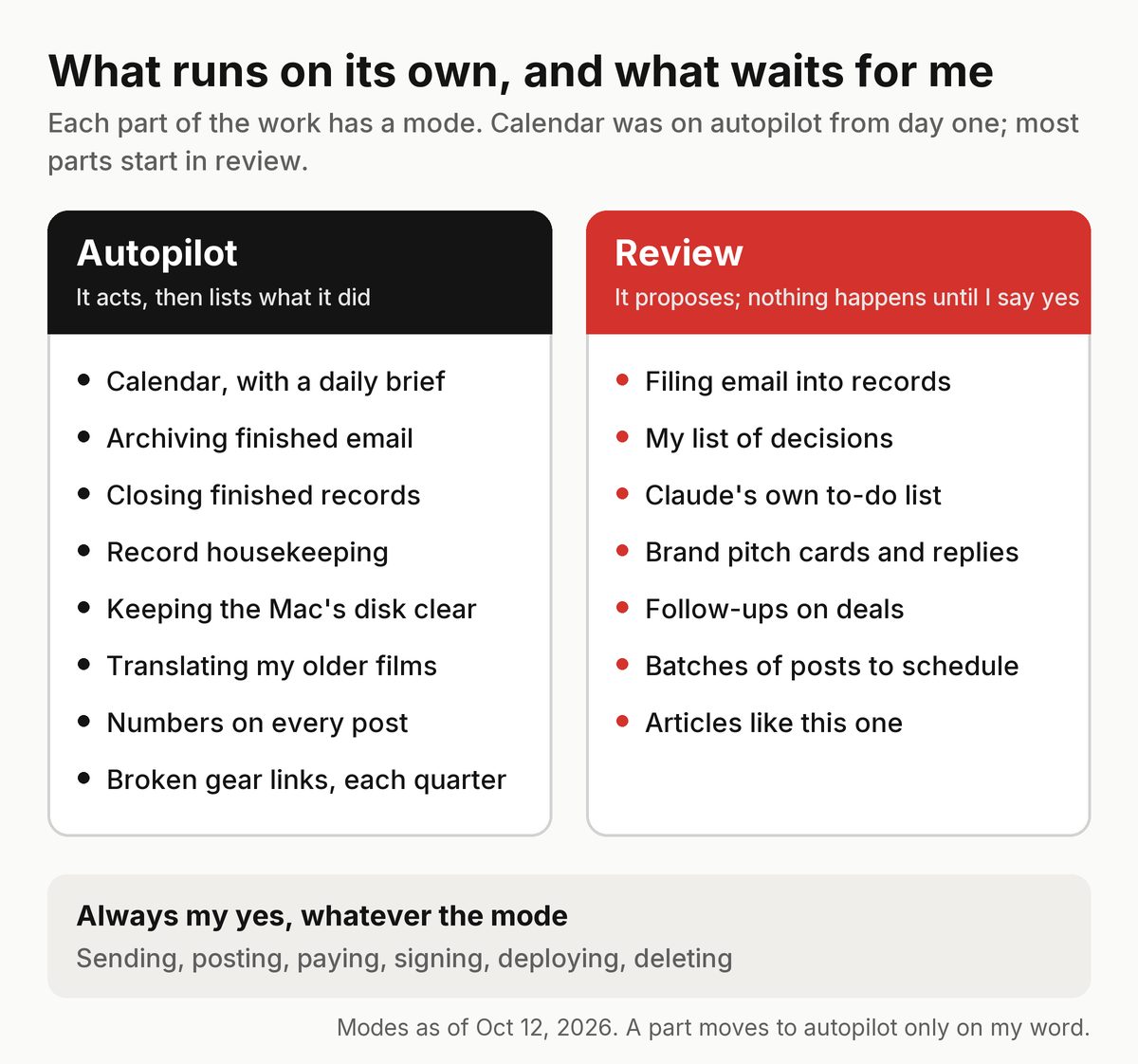
The calendar went on autopilot from the start. I never want to type in it: "i might reference it on my phone time to time but i'll usually interface the cal through claude chats here." Why that part first: "cal is less risk so that's why it's enabled to be on auto pilot now."
Email is the opposite. Filing it stays in review, and sending is paused completely. The goal is the same as the calendar, just later: "i'd rather always interface email through claude but that's eventual and requires more trust to become auto pilot, that's why we're manual for now."
How much steering a task needs depends on what a mistake would cost. Text and records are cheap to redo, so my general direction is enough. Video work is not: "if we start doing like video editing work, it would take a lot of compute energy, time, and money. And if we go in the wrong direction, it could cost us a lot." So big jobs start with a small sample for my yes.
How I answer it
There's one current list, never a backlog. Each item says what Claude saw, what it would do and why, and its recommendation. I answer with "yes", "no" or "change it", or in shorthand like "1 y, 2 n, 3 steer: shorter". I went through the first list on my phone during a walk.
There are no command words. As I put it: "i'll just use plain language in chat to give feedback or instructions probably." Saying "pause everything" or "undo that" in my main chat sets the mode, and the routine reads it on its next run.
Day one
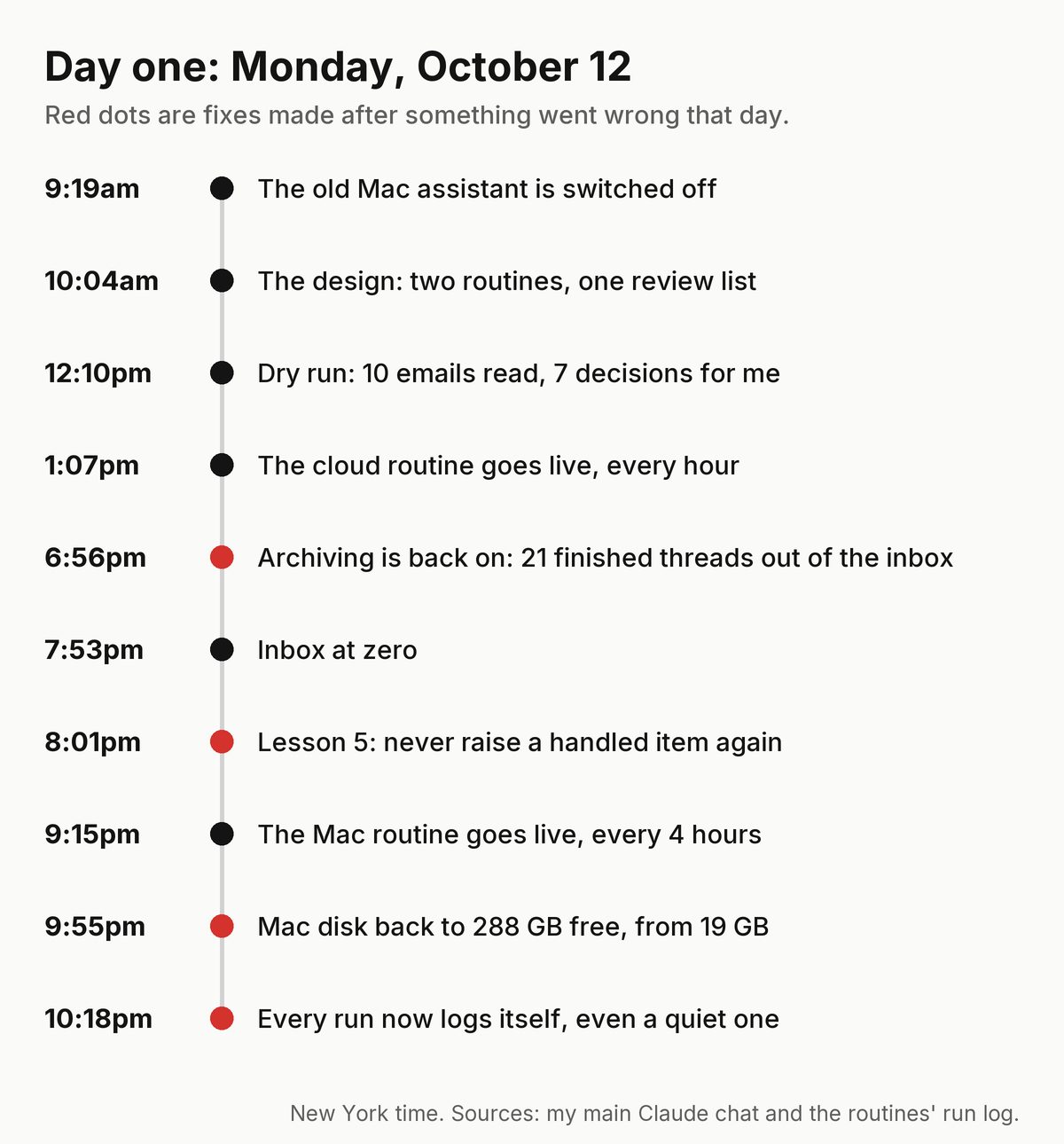
The cloud routine went live at 1:07pm and ran every hour after that. It read each new email as it came in, filed what mattered in KraigOS and sent nothing. The Mac routine had a dry run at 8:28pm that read everything and changed nothing. It found four small jobs it was ready to do, like adding each film's Drive folder to the media index in KraigOS. When Claude asked me to start it by hand, I said: "just do it yourself." It went live at 9:15pm, every 4 hours.
What went wrong, and the fix for each
Day one wasn't clean. Each problem became a rule.
- Brand pitches piled up. I had paused automatic archiving that morning, so the routine filed every email but left all of them in my inbox. By the evening I said: "There are still a lot of emails in inbox." Archiving finished threads went back on autopilot, and brand pitches got their own rule. That evening is its own article: Inbox zero with AI.
- A question I'd already answered came back. I'd dealt with it in my main chat, but the routine's list still had it open. The fix is lesson 5: before raising anything, check it wasn't already handled. The list now has a Handled section.
- Bookkeeping on my list. An early list asked me to approve record housekeeping. My reaction: "I don't know, fully understand what you're waiting for me to decide here now. Like, what am I reviewing?" Lesson 1: housekeeping is Claude's job, and the list holds only real decisions.
- Choices instead of drafts. Claude asked me to choose between two story arcs for a photo post, described only in words. I asked: "Why can't you just draft up the entire post so I can review what the slides look like or caption looks like or whatever?" Lesson 4: show the real draft, then let me react.
- Quiet runs left no trace. A run that found nothing skipped its log line. I said "fix it now", and now every run ends the same way, even a quiet one.
- My Mac filled up. It was down to 19 GB free. The old setup backed files up to Drive but almost never removed the local copies, and I said so: "it seems like it's been doing a bad job of getting rid of files that we might not need anymore." By 9:55pm it was at 288 GB free. Now the routine keeps it above 300 GB, never starts a big job that would drop it under 100 GB, and only moves safe copies to the Trash, which I empty myself.
The lessons list
The corrections live in one KraigOS record that every run reads first. After day one it had five:
- Don't put bookkeeping in front of me. Do it and list it.
- Risk decides how much steering a task needs.
- Brand and deal decisions need the full picture before a draft reply.
- For creative work, show the thing, not abstract choices.
- Never raise something already handled.
Keeping each run small
Claude measured the old setup: before doing any work, each run read about 24,000 words of rules and notes. Now a run starts with a short brief of about 1,500 words, a note for each part it works on, and the two records. A check warns when a file grows past its budget. I wanted that fixed for good: "it might get bad again in a week or month so we need to fix this problem once and for all right?"
Claude also manages how often the routine runs, so the week's work fits my plan's limit. My words: "help me do better work for less money. claude should help me do this all efficently. i don't want to waste money or compute".
What's next: earning autopilot
The plan on day one was a scorecard on October 19, then a yes or no on each part. On October 13 that became a running track record instead. Every item on my list now says what the routine would do on its own. When I answer, it logs whether I agreed, changed it or said it was wrong, and a wrong call also becomes a lesson. Each Sunday I get a short scorecard, and a part that has matched my answers 15 times in a row gets a card asking to move to autopilot. Only my yes moves it, and one real mistake on autopilot puts it back in review. My answer to that plan: "Yeah, let's set it up this way." Some things never get there: sending in my name, money, deal terms, contracts and security.
Articles went first. I said: "I want the entire process automated. I don't want to have to review it, and I don't want to have to deploy it." So the routine now writes articles from finished work and publishes them only when every check passes: a fact check by a second, fresh Claude against the article's sources, the site's tests, and a list of things never to write about. Anything that fails waits as a draft. More on the whole system on the KraigOS page.
FAQ
What was Auto Claude?
The name of the first version: two Claude routines, one in the cloud every hour and one on my Mac every 4 hours. On October 13 I folded them into one routine and renamed it KraigOS.
What does the routine do now?
Every 4 hours, overnight too, it reads new email and files it in KraigOS, keeps my calendar, works through Claude's to-do list, handles files and Drive, keeps my Mac's disk clear and writes articles. Anything that needs me goes on one review list.
Does it send emails on its own?
No. Sending is paused. A reply goes out only after I say yes to the exact text in my main chat.
What does it do without asking?
My calendar, archiving email that's fully done, closing finished records, record housekeeping, keeping my Mac's disk clear, translating older films, reading the numbers on my posts and publishing articles that pass every check. Each action is listed with how to undo it.
How does it learn from mistakes?
Every no or change I give becomes a short lesson in KraigOS, and every run reads the lessons before it starts.
Do you need a Mac for this?
For my setup, yes, since October 13: the one routine is a scheduled task in the Claude app on my Mac, and it runs while the Mac is awake. On day one the cloud half ran on my Claude account with the Mac closed, so a cloud routine works too if you don't need files or a signed-in browser.
Newsletter
Get my letter
Get a short letter from me every couple of weeks: new trips, guides and what I'm building.
Free. Unsubscribe any time.
Details
- How it works: the parts and the routines.
- The overview: what it is and why I built it.
- By the numbers: every time an AI was set to work for me, week by week.
The build log, every entry, is the timeline below.
Timeline · newest first
Devlog · November 1, 2026
A desk for Google Drive
Several agents work in my Google Drive, and a folder that moves in the middle of a job breaks the job.
- An agent using a Drive folder now holds it, and nobody can move a held folder or anything inside it.
- Every move goes in one log, so any agent can follow an old path to where a file is now, or put a move back.
- This is the first piece. Keeping Drive tidy on its own comes next.
Devlog · November 1, 2026
Whole films on TikTok, built and held
My shorts already go to TikTok on their own. TikTok also takes videos up to 10 minutes.
“Not yet”Kraig, Nov 2, 6:43 am
- A film gets its own TikTok cut, 10 minutes at most, and goes up whole and horizontal, one a week.
- Films stay off until I've watched one go up myself.
- The first test upload worked but its schedule step didn't, so nothing posted. I'm leaving it off for now.
What happened next: I'll look at it again in a week.
Devlog · November 1, 2026
Searching my footage by meaning
Every shot in my film library is logged as a moment with a written description, but search only matched the words.
Claude: Embedded every logged moment on my Mac and added a meaning search next to the word search.
- All 53,408 logged moments now carry a meaning vector, made by a small Google model on my Mac in 26 minutes.
- Search mixes words and meaning, so asking for a shot finds it even when its notes use other words.
- On a test of 25 real searches, the right shots in the top five went from 54 to 60 percent.
Devlog · November 1, 2026
Comment hiding is on
Built a few days ago and left off until I was ready.
- I switched on hiding for hate, slurs and comment fights under my posts.
- Every hidden comment can be unhidden, and nothing is ever deleted.
Devlog · October 31, 2026
Route maps in satellite
My route-map shorts used a blurry map. Claude made two test cuts of the same trek, one satellite and one topo.
“A, satellite”Kraig, Oct 31, 8:24 pm
Claude: Re-cut six route-map shorts in the satellite look and held them for my review.
- The map on top is a still satellite image that draws the route day by day, with film shots below and one caption line.
- Each re-cut is 20 to 25 seconds and small enough for every platform.
- Nothing posts until I say yes to each one.
Devlog · October 31, 2026
A music test on Facebook
I wanted to know whether calm music or a film score works better on Facebook Reels.
- Three clips, each cut twice: once with calm music, once with a film score, six reels in all.
- I approved the six and their schedule in one go; they go out a few days apart and the numbers decide.
Devlog · October 31, 2026
KraigOS got smaller
A month of fast building left parts of the system that nothing used anymore.
Claude: Found every piece of code nothing called, took it out, and ran every test before it went live.
- Took out the parts nobody called anymore: an old email worker, a calendar sync, the old social worker and a few review tools.
- The running code is about a fifth smaller.
- The instructions every agent reads first went from about 1,400 lines to under 500, cut to what actually runs now.
Devlog · October 31, 2026
A board for each film launch
My last film's trailer was scheduled outside the factory, so the calendar showed gaps that weren't there.
- Each launch now has one screen with every post around it, the film included, and one Approve sets them all.
- Launch posts take the place of that day's regular post on the same platform, over a two-day window.
- Posts that point to the film wait until it's public, then go out on their own.
- The texts and chores around a launch go to Claude as tasks.
Devlog · October 31, 2026
An Undo button on Work
I said No to a short by accident and there was no way back.
“i just said no to the torres short by accident. there should be an undo button on the top of the work page.”Kraig, Oct 29
- After every tap on Work, the top shows what I just did with Undo for ten minutes.
- Undo puts it back exactly as it was, and refuses, saying why, once the move has already reached a platform.
- A cut I've sent back for a re-cut leaves Work until the new version is ready, so I never answer one twice.
- A cut that's only too big for X now says it passes everywhere else, and offers a smaller copy for X.
Devlog · October 31, 2026
One page that explains the whole system
People asked how this all fits together, so I wanted one page a stranger could read top to bottom.
Claude: Built the page from my interview answers and checked every word against the devlog's privacy rules.
- A new How it works page has a diagram you can tap: what comes in, the agents with me in the middle, the one place everything is stored, and the platforms posts go out to.
- A clock shows what runs over a day, and each piece has a short story on top with a deeper part for builders.
- It ends with the safety rules and five steps to build your own.
- How it works, By the numbers and this log now share one menu.
Devlog · October 30, 2026
Hiding comment fights, built switched off
Some threads under my posts turn into fights between strangers, and I'd rather never see them.
Claude: Built the hiding step and left it off until I turn it on.
- Claude can now flag a comment as hate, a slur or a fight between commenters, with a one-line reason and never a quote.
- While the switch is off, I only see a dry run: how many it would hide, by kind.
- Once I switch it on, each one is hidden on its platform, never deleted, and any single comment can be put back.
Devlog · October 29, 2026
Every post named by where it goes
A post said only its platform, so an Instagram trial reel and a feed post, or an X video and an X link post, were judged against each other.
- Every post now carries its placement, like Instagram trial reel, X link post or YouTube Short, and once a placement has five posts, a new one is judged against its own kind.
- Each new cut and re-cut waiting for me is its own row on Work with Watch, Yes and No.
- Replies people leave on my Threads posts now come into Work like other comments, and an answer goes out only with my OK on the exact words.
- The numbers for X videos I scheduled by hand are now read at 24 hours and 7 days like the rest, with each post counted once.
Devlog · October 29, 2026
A phone line fans can call or text
I wanted a way for people who watch my films to leave a message without an inbox or a comment section.
- There's now a number anyone can call or text, listed on my site's call page with its texting terms.
- Every voicemail is transcribed, and Claude reads each one before anything reaches me, sorting it as a question, a story, praise or feedback, and filing away the rest unread.
- Nothing ever replies to a text on its own, and callers are never stored by their number in plain form.
- Each message worth my time becomes one card on Work.
Devlog · October 29, 2026
One Work list, with sub-items and decision trees
Work was split into sections by area, and big items hid the small decisions inside them.
“i want everything in one list, just with different color labels for you, decide, auto, etc”Kraig, Oct 29
- Work is one list by priority, each row with a colored label: You, Decide, Claude, Auto or Suggestion.
- An item can sit under a parent, so a project shows its pieces underneath with a line like "1 sub-item, 1 needs you".
- An item can carry a tree of decisions, each with Claude's call and my answer. When my answer differs from the call, it becomes a lesson for next time.
- A Develop button copies a prompt that walks me through the open decisions one at a time.
Devlog · October 29, 2026
Auto puts my newest asks first and measures its own effort
Auto worked its list in a fixed order, and I had no idea how much of my weekly AI plan each job used.
“it should prioritize recent builds”Kraig, Oct 29
- Auto's list now goes by priority, then the newest ask, then the quickest job, so what I asked for today comes first.
- Each item records the share of my weekly plan it was expected to use and what it really used, and once a kind of work has three clean readings, new estimates follow them.
- Auto now works only the items I've flagged for it; the rest wait in a backlog row I can flag from.
Devlog · October 29, 2026
Every film becomes a family
- Each film or launch is now a family with every piece made from it: shorts, posts, articles and newsletter mentions.
- KraigOS sees where a family has gaps, like a film with no post on X or Threads yet, and drafts up to 3 pieces a day to fill them. Each one is a card I approve, steer or skip.
- The Content tab opens on reach: video views, article and guide reads, X posts and newsletter opens side by side against the 30 days before.
- Its schedule shows the next two weeks of posts on every platform, with the open days marked.
Devlog · October 28, 2026
Auto learns how long its work takes
After Auto's first evening I asked for five fixes at once.
“Do all 5 right now”Kraig, Oct 28
- Each finished item keeps how long it really took next to its estimate, and once three of a kind have closed, new estimates for that kind follow the real times.
- Each item also keeps which model and effort level it ran on and whether that was the right pick, so later picks learn from it.
- My own asks jump to the top of Auto's list, and an item is claimed before work starts so two helpers can't do the same one.
- A piece isn't done until the part I can see has shipped, and a website change raises a card with screenshots for me to publish.
Devlog · October 28, 2026
A switch for Claude's own work
The hourly night relay worked through Claude's queue on a fixed schedule. I wanted to decide when it runs.
“auto on”Kraig, Oct 28
- Claude's queue now runs only while my Auto switch is on: I turn it on when I'm busy elsewhere and off when I'm back, and nothing starts on its own at night.
- When it goes off, Claude stops at a safe point and writes down where it got to.
- The app went down to four tabs: Work, Content, Money and Auto. Work is one list of what's mine, Auto is Claude's list.
- Every item on Auto's list has a time estimate, and the list shows the total.
Devlog · October 28, 2026
The planner follows the numbers
- The content factory's planner now reads how each place and format has done on each platform before it fills the next week.
- A place that keeps landing far below a typical post on one platform rests there for 30 days, and a piece from it that never went out still gets one test.
- No two posts land within 3 hours of each other on the same platform and day.
Devlog · October 27, 2026
The night shift becomes an hourly relay
“switch to the hourly relay from 11 PM tonight, and let it deploy builds whose tests pass (I'll review in the morning)”Kraig, Oct 27
- Claude's queue is on the timeline: what Claude works on next and roughly when, tonight's list included.
- From 11 PM to 6 AM a task on my Mac starts every hour, takes the next item in the queue, works it for about 50 minutes and hands off.
- A leg skips its turn if I'm using the Mac or another leg is still working.
- Builds whose tests pass may now go live overnight. From 5 AM it works Claude's own list, and the 6 AM leg leaves me one review card.
What happened next: The first night built a long-form YouTube upload route and a post planner steered by the numbers, each on its own branch with tests passing, and cut three map-route shorts that wait for my review.
Devlog · October 27, 2026
The app in five tabs
“build the new five-tab app, Today, Decide and Claude first”Kraig, Oct 27
Claude: Built a clickable mockup of the redesign first, then the app from the version I picked.
- The app now has five tabs: Today, Decide, Content, Money and Claude.
- Today shows what needs me and whether everything is running. Decide holds every call that's mine, top priority first, each on its own page.
- Claude shows what it will work on next, its suggestions and a searchable log of everything it did.
- The same night Content got its own sub-tabs: schedule, review, ideas, performance, library and writing.
- Posts I have to make by hand at a set time became a to-do list on Today instead of decisions.
Devlog · October 27, 2026
Every post gets checked after it goes up
“deploy each lane on its own when its tests pass ...”Kraig, Oct 27
- 15 minutes after each post's time, and again at 1 hour and 6 hours, KraigOS looks the post up on its platform, reading only.
- It checks the caption against the one I approved and keeps the post's link so its numbers can be read later.
- It raises one card only when something is wrong.
- Only one helper can drive my Chrome at a time now: each one claims it for 30 minutes, renews the claim while it works and gives it back when it's done.
Devlog · October 27, 2026
One list of what needs me, by priority
“for 7 let's place these all in workbench but organize priority at the top”Kraig, Oct 27
- Every decision card, proposed rule change and open thread that needs me is now a row on one Workbench, ordered by priority: top, high or normal.
- Claude sets each priority and I can change it.
- A System screen lists every connection the system relies on, with what to do when one stops working.
Devlog · October 26, 2026
Nothing started gets lost
“I really want to keep my notes, my ideas, things that we start but don't finish. In one place, in the timeline, so that I can work on a bunch of things at the same time and know that I'm not losing it.”Kraig, Oct 26, 3:12 pm
- Everything started and not finished sits in one list right under Now, each thread with where it stands, the next step, who has it and a day to look again.
- A first sweep of the last 30 days found 132 open threads; the ones that had gone quiet show Claude's suggestion.
- A Note button saves a new thread at once, and each thread is one tap to done, parked, dropped or handed over.
- Later that night the app got a Dashboard tab: every platform's numbers in one place, filtered by platform and by 7, 30 or 90 days.
Devlog · October 26, 2026
A night shift
“I want my AI to be chugging along. Like I want it to be constantly working, doing things. ... At this point, like I'm the bottleneck, like me giving it instructions and reviewing things.”Kraig, Oct 26, 3:50 pm
- Every night at 1 AM a task on my Mac works through a queue of self-contained packages until morning: it prepares, researches, drafts, analyses and builds on branches with tests.
- It never sends, posts, spends, deletes or deploys. What a package needs from me becomes one question at a time in an interview queue, with a recommended answer.
- Proposed rule changes wait for me as cards too, with the rule as it reads now next to the new text.
Devlog · October 26, 2026
Every post gets a verdict
- Each post is judged at 24 hours and 7 days against a typical post on its platform: a win, typical or a miss, with why.
- A format that keeps landing above or below typical becomes a lesson that every new edit brief reads first.
- One short update post a day about what I built goes to X and Threads as a card I approve, edit or skip; it can go automatic after 20 approvals in a row, if I say yes.
- Links I save for inspiration get a breakdown (hook, pacing, length, why it works) and grow into a library of named formats.
Devlog · October 26, 2026
The devlog publishes itself
“Yes, set up Git deploys for the website so the daily routine publishes the devlog itself.”Kraig, Oct 26, 2:08 pm
Claude: Connected the website's GitHub repo to Cloudflare's Git deploys and gave the morning writing routine the repo.
- Every push to the website's live branch goes live in about two minutes, with no deploy from my Mac.
- The morning writing routine in the cloud commits these entries itself, and the site's own privacy check still stops anything that shouldn't go out.
- This entry and the three around it are the first it published on its own.
Devlog · October 26, 2026
The timeline as a funnel
- Cards get heavier as they come due, so what needs me today stands out.
- Just below Now sits what the automation decided since I last looked, each line with Looks right or Steer.
- Past yesterday the timeline zooms out into daily lines, the week in four lines and the month's arcs, with the full log one tap away.
Devlog · October 26, 2026
Builds in parallel
“What I would love is for everything to just work faster, even if it burns through compute or costs me more. ... time is really the bottleneck.”Kraig, Oct 26, 12:57 pm
Claude: Wrote this catch-up from one of those lanes while the others built.
- Big builds split into lanes by the files they touch, each with its own Claude working at the same time; one lane merges, runs every test and deploys.
- Test suites take turns, so two lanes never run into each other.
Devlog · October 26, 2026
Facebook and TikTok, hands off
“I don't want to have to post anything myself on Facebook.”Kraig, Oct 26, 10:48 am
“Like, whatever long form I make, I want shared on everywhere it can go.”Kraig, Oct 26, 10:49 am
- Facebook's direct route waits behind a first run I watch: the next approved short is set up and held, my Go posts it, and only once it's live does a card ask whether Facebook can run on its own.
- TikTok goes through the clipping tool I already use, which schedules each approved short at its time with its exact caption, after the same kind of held first run.
- Long form becomes one lane: every long video goes everywhere it can, and every idea gets a next step and a date on the timeline.
Devlog · October 26, 2026
Heartbeats
That day I found out two things I'd assumed were running weren't: the daily posts about the build had never been switched on, and this devlog had stopped at Oct 19. Nothing on the timeline showed either.
“Because right now, I assumed that my X posts were being drafted and sent, but they have not been. I didn't know that was off.”Kraig, Oct 26, 11:28 am
“I expect the devlogs are still being updated. So if they're not, that's a big problem.”Kraig, Oct 26, 11:28 am
- Every automated stream reports a heartbeat: shorts per platform with the next post and days queued, long form, the writing, and every job the plain code runs.
- A stream that's late or running low becomes a card on the timeline, with since when and what Claude would do about it.
Devlog · October 26, 2026
A plan for the next phase
“I want to just build and create and develop and work and have all of it stored and analyzed. And I want all of these content pieces to just automatically be made and posted for me. You know, that's the dream of this whole system.”Kraig, Oct 26, 11:28 am
“I want everything to just be on a 24-hour cycle when it comes to like building, so I can just each day reassess like what's going on, and then I'll tweak it from there.”Kraig, Oct 26, 11:34 am
- Every content stream runs review-first, then automatic once it's proven: shorts, long form, posts on X and Threads, this devlog.
- Every routine runs on the same 24-hour cycle, so each day I can look at what happened and tweak.
- One daily writing routine each morning reads the last day of the timeline, drafts the day's post for X and Threads for my review, and writes this devlog when there was real work.
- A journal article only when a single-topic story has finished, and a newsletter only for a big launch, together with its journal entry.
Devlog · October 26, 2026
Everything that happens, on the timeline
“i want the KraigOS timeline to include all work done with claude as well.”Kraig, Oct 26, 9:26 am
“basically i want to look at the timeline and find things to work on, develop or unbottleneck for the AI”Kraig, Oct 26, 10:10 am
“ideas should be a part of the main timeline as well”Kraig, Oct 26, 10:10 am
- Every build, fix and update done with Claude gets a line on the timeline as it happens.
- So does everything that happens on its own: posts going live, comment counts each hour (never the words), records added or closed.
- Work items show up with Claude's recommendation and three moves right on the row: not important, next week, done.
- The best ideas wait in Anytime, with Try as a post or Park it.
Devlog · October 26, 2026
An upload that kept starting over
A large Short failed partway through its upload, and every five minutes the factory began it again from the start, using up the day's upload allowance.
Claude: Found it in the run log the next morning and fixed it before anything else.
- Uploads go up in pieces and pick up where they stopped; a finished one is read back, never sent twice.
- At most three upload starts a day, failed ones included.
- A failed upload gets one retry at the next good time, then becomes a card for me, never another try five minutes later.
Devlog · October 25, 2026
An overnight upgrade
“i want to plan out a large overnight upgrade for the KraigOS dashboard.”Kraig, Oct 25, 9:23 pm
“i also want a single analytics across all platforms into one”Kraig, Oct 25, 9:27 pm
Claude: Built the pieces one after another overnight, each one tested and deployed before the next began.
- A page for each platform: what's next, its switch, and every post with its views at about an hour, a day and a week.
- One analytics view across every platform, by day and by week, with every gap said in small print.
- A content scoreboard ranks every clip by its views across all platforms and shows which places and formats win; "make more like this" turns any clip into a suggestion card.
- Two private pages for the business side, which stay off this devlog.
- The app opens at once from a saved copy of each screen and never jumps while I'm reading.
Devlog · October 25, 2026
Watched before it's switched on
Claude rehearsed the Facebook route with me watching: one real reel, scheduled step by step in Facebook's own scheduler.
“Yes, schedule the ... reel for real and turn on Facebook's Business Suite route.”Kraig, Oct 25, 9:01 pm
- No new way of posting goes live until I've watched it work and said so.
- The Facebook route schedules only 36 hours ahead, since what we post keeps changing.
- A post nobody scheduled in time goes back into the queue at the next good time, never lost.
Devlog · October 25, 2026
The app becomes a timeline
“I think the best design for KraigOS is just like a running log. And things that are going to recommended to do appear like into the future. And then we stay on like the present, and then we can see the running log of all the decisions that were done by auto or me or steered.”Kraig, Oct 25, 3:15 pm
- The app opens on a Now line: posts due in the next two days above it, the log of everything decided below, newest first.
- Each decision sits at the time it starts holding something up, and anything overdue is pinned in red right above Now.
- Every run of the plain code gets a line too, so a failed run always shows.
- Things without a date yet wait in an Anytime section.
Devlog · October 25, 2026
Posted once, fine everywhere
“But we will for sure be uploading long videos to Facebook that won't be able to be compressed down to 10 megabytes. So we need both options available.”Kraig, Oct 25, 2:12 pm
“if a post has been published on social media platforms it's probably okay to be posted on the others so no review needed right? i only need to review newly created content made by AI”Kraig, Oct 25, 3:56 pm
- A clip that's already live on one platform and passes the check on another is approved there on its own, and the log says so. New cuts made by AI, re-cuts and failed checks still wait for me.
- Facebook gets two ways out: shorts with a good copy under 10 MB are scheduled by Claude in Facebook's own scheduler; everything else, and every long video, goes through the API.
- Approving a clip pins the exact cut that will post, and the card plays exactly that file.
Devlog · October 25, 2026
Decision cards and one master log
“each decision should have the AI's judgment described out, and I should be able to approve it as the AI suggests, or steer it with my feedback. And with each time I approve or steer, it should feed back into the system to make better judgments.”Kraig, Oct 25, 11:56 am
“I would like one general master log of all of the decisions that are made for KraigOS.”Kraig, Oct 25, 11:59 am
- Every agent logs what it decides on my behalf, and the plain code logs its own automatic moves too.
- What needs me is a card: the situation, the AI's judgment, how sure it is and its call. I approve it, or steer it with a note.
- A steer becomes a lesson every agent reads from then on, and the card comes back once Claude has redone it.
- Suggestions for improving the system are cards too, drawn differently.
- After 20 approvals in a row on one kind of card, it asks whether that kind can run on its own.
Devlog · October 25, 2026
A switch for each platform
“what happens when we turn on instagram. i need to be able to see that”Kraig, Oct 25, 11:14 am
“under the instagram on card i should be able to see the 3 post queue”Kraig, Oct 25, 11:15 am
- Each platform has its own On/Off switch; a platform that's off posts nothing.
- Its card shows the next three posts and where each one is on its way out: fetched, queued, posting, live, or why it stopped.
- Cards that need me hold everything it takes to decide, with the buttons right in the card.
Devlog · October 25, 2026
Simpler, not smaller
“I think we need to simplify the dashboard to just have exactly like what I need, and then maybe we'll build it out from there.”Kraig, Oct 25, 8:36 am
“I don't want to get rid of the modules ... the dashboard just has to make it easier for me to do what I need to do, you know?”Kraig, Oct 25, 8:50 am
- Home leads with what needs me, up to three things from every part of KraigOS, each with Claude's pick.
- Then what's posting next, what the system did today, and one sentence on why each number moved.
- Details fold away under each section instead of a new screen.
Devlog · October 24, 2026
A cutting room
Claude: Wrote a cutter that runs on the Mac when started by hand, never as a background job.
- Published films with no shorts yet get new vertical cuts from their strongest moments, with the film's own sound.
- Any shot with words on screen is swapped for the next moment.
- Each cut is checked like every other short and waits for my yes in the app, with a timeline I can open in my editor.
Devlog · October 24, 2026
Review where I can watch
“Like I need to just be able to review and watch the short.”Kraig, Oct 24, 8:55 pm
“Yeah, I don't want to review them in Claude Code like this. I want to review them in KraigOS app, whatever we're calling it, the content factory, artifact, or whatever.”Kraig, Oct 24, 9:01 pm
- Reviews happen in the KraigOS app: a 7-day deck, one card per clip, the clip playing right in the card, No and Yes under my thumb.
- One yes approves the clip for every platform it passed the check on.
- Every card shows the system's own call, and every no says why: not interesting, a mistake, or an edit note for a re-cut.
- The app itself: a clean look in light and dark, one status line, three suggested moves, everything else one tap down.
Devlog · October 24, 2026
Autopilot, one streak at a time
“so I can help steer and understand that things are working well enough to be automated.”Kraig, Oct 24, 9:03 am
- Each job, a platform plus a format, keeps a streak of how often my call matched the system's.
- After 20 in a row the app offers to make that job automatic. My yes turns it on; a mistake I flag turns it back to manual.
- A piece that failed its check, or was never checked, is never approved automatically.
Devlog · October 24, 2026
A dataflow, not a gallery
“I want to start treating instagram then also YouTube more like my other platforms. Share everything, just keep shipping. More like a dataflow than a curated gallery”Kraig, Oct 24, 6:53 pm
- Instagram and YouTube Shorts take everything that passes the check, the same as the other platforms.
- New reels start on Instagram as trials, shown first to people who don't follow me yet.
- Shorts go up to YouTube private, set to go public at their slot's time.
Devlog · October 24, 2026
Never the same clip twice
“Yes, build the posted-history sync: read every post on my Instagram (then TikTok, YouTube Shorts and Facebook), match them to clips, mark them posted, then re-plan the week without repeats.”Kraig, Oct 24, 3:35 pm
Claude: Read back every post already live on Instagram, Facebook and YouTube and matched each one to its clip, only on a clear match, so the planner knows what's been posted where.
- Before each plan the factory reads what's already live; a clip never goes back to a place it's been.
- A piece never goes to two platforms within 2 days of each other, counting its real posts and everything already queued.
- When every piece in a pool is too close, the day stays open instead.
Devlog · October 24, 2026
The factory's first machines
“The dashboard is for all of KraigOS. The content factory is just the biggest part of it”Kraig, Oct 24, 7:51 am
“So I want the AI content factory so we can just start posting and creating content automatically. I'm just like basically automating my work.”Kraig, Oct 24, 9:03 am
- Every clip, film, photo and article is one piece; re-cuts of a clip count as the same piece.
- A check on my Mac looks at each short against each platform's rules, like text inside the safe area and no words added on screen in the edit, before it can be queued there.
- Every morning each piece gets a score out of 100 for each platform from how it did there before, where 50 is a typical post.
- A planner keeps each platform's next 7 days filled, with captions shaped for each one, and every fifth slot tests a different format.
- Nothing posts until I've approved it.
Devlog · October 23, 2026
I set the goals, Claude designs
“I mean, I'm just telling you the goals, and I can come up with my own design of how to accomplish it, but I feel like you need to be the one to do that. So you need to be more proactive in asking me for steering to make better judgments.”Kraig, Oct 23, 5:28 pm
- A new rule for every agent: I give the goals; Claude designs the system and asks me only the questions that steer it.
- Every video and photo I capture, every piece cut from it, where each has and hasn't been posted, and how it did, all kept in one place.
Devlog · October 23, 2026
A factory for everything I make
“Would it be possible to build like a visual dashboard interface that's like a factory that shows the AI content factory, shorts, long form, the pipelines into each platform? ... And I like factories, so.”Kraig, Oct 23, 2:23 pm
“Basically, every piece of content that I ever make should be checked whether it's been uploaded to every platform. And if it hasn't, it makes it eligible to be uploaded in the content queue.”Kraig, Oct 23, 4:41 pm
- One queue per platform, filled from everything I've already made, posting one at a time at a steady pace.
- Each queue keeps at least three days of posts. One running low is the signal to make more for that platform.
- Shorts are for discovery: they lead people to the long films.
Devlog · October 22, 2026
Posts about the build, within limits
I'd assumed short posts about what I'm building were already going out on X. Nothing was posting them.
“Like, I want like at least one or two posts on X just about what I'm building or doing or working on from the devlogs or what I publish or content.”Kraig, Oct 22, 3:19 pm
- Posting to X is back in the plain code in my Cloudflare account, with a standing approval for up to two posts a day about what I'm building, written from KraigOS's own records.
- Those posts never touch family, clients, deals or security, always carry a link or a picture, and never land within six hours of another post.
- Every other post on X still waits for my yes on the exact words.
What happened next: The posting side went live that night, but the daily job that writes the posts was never switched on. Nothing showed me that until Oct 26.
Devlog · October 22, 2026
A lesson from every post
“the plan has been for us to post and ship a ton of content so that we get feedback on every piece ... Like, I just want to post a lot and learn from every single one.”Kraig, Oct 22, 2:48 pm
“Yeah, that now background routine sounds great. Let's set that up and start it.”Kraig, Oct 22, 3:13 pm
- A second cloud routine reads every post's numbers and comments once a day and writes one lesson per post beside its clip.
- On Mondays it writes up which formats are working and which aren't.
- It never posts and never changes a setting.
Devlog · October 22, 2026
Mornings start with a brief
“I think I like having a morning brief that does an inbox zeroing as well. Then I usually like to go through interview cards for decisions and steering”Kraig, Oct 22, 10:53 am
- Saying "morning" starts the day: a short brief, the inbox down to zero, then one card at a time for the decisions that need me.
Devlog · October 21, 2026
The inbox moves to the cloud
“... ideally, I don't even have to look at my Gmail or Google Calendar ever again. Like, I just want to interface through Claude.”Kraig, Oct 21, 10:24 am
“So let's get to a point where you can automate and manage my inbox and my calendar completely”Kraig, Oct 21, 10:24 am
- A Claude routine in the cloud runs four times a day: it sorts the inbox, writes drafts and keeps my calendar, with my Mac off.
- Its notes live in one KraigOS record, so each run, and any other agent, picks up where the last one stopped.
- Nothing goes out in my name until I've said yes to the exact draft.
Devlog · October 19, 2026
More reach for the same work
“I'm making the content, so like, why not post it to more people, right?”Kraig, Oct 19, 11:43 am
- A working rule, saved in KraigOS: every quote for a video also offers the same video on more platforms.
- The pitch is more reach for the same production.
Devlog · October 19, 2026
Inbox sessions end at zero
“So have we zeroed the inbox? Like, as we accomplish tasks or don't need to do anything else, we should archive, right?”Kraig, Oct 19, 11:51 am
- Every inbox session ends with the inbox empty: once a thread needs nothing more, it's archived, never deleted.
- Each session also checks mail that was archived without a reply, so nothing slips out of sight.
Devlog · October 19, 2026
A record that fell behind
A Claude session had finished a piece of work but never wrote it back to its record, so another agent read the stale record and said nothing had been done.
“That seems like a huge problem that we need to solve.”Kraig, Oct 19, 12:06 pm
Claude: Audited every open record against the real files, in the background while we kept working, and corrected the 9 that had fallen behind.
- A new rule for every agent: add a dated line to the record as the work moves, not only at the end.
- Before saying nothing's been done, check the project's home.
Devlog · October 19, 2026
The devlog keeps up
“I really want to share the behind the scenes of KraigOS development, the decisions, the builds, so that people can follow those”Kraig, Oct 19, 1:00 pm
“keep actual numbers and private information out of it”Kraig, Oct 19, 1:00 pm
Claude: Wrote the entries from Oct 15 on from the code history and my own messages, through the same privacy check as every other entry.
- The devlog follows the work: the builds and decisions as they happen, never the business they're for.
Devlog · October 18, 2026
Any agent, any platform
“my goal is to use any and all agents/platforms to do work all connected to KraigOS and able to see what each other does”Kraig, Oct 18, 4:52 pm
- Google's Gemini agents on my Mac join as full agents, each under its own name: the guide first, then the work log and project homes.
- Every agent sees what the others have done, in the same records.
Devlog · October 18, 2026
Every project has a home
“put it live”Kraig, Oct 18, 1:26 pm
- Each project's record names its permanent home, a GitHub repo or a Google Drive folder, and its working copies: who keeps each one and when it last synced.
- No project lives only on one agent's computer. Anything worth keeping goes home by the end of each session.
- Once a week each agent's workspace is swept for strays, stale copies and missing homes.
- KraigOS keeps only where things are, never the files.
What happened next: On the first day, 72 open projects had no home yet.
Devlog · October 18, 2026
Claim it before you do it
Grok had planned a lineup of posts and kept it in its own notes, where no other agent could see it.
“why didn't grok share the info in a way KraigOS can keep? and all LLMs can access”Kraig, Oct 18, 8:40 am
“Yes, put step 1 live: ... the check-and-claim rule.”Kraig, Oct 18, 9:41 am
- KraigOS is the source of truth for all work: before any outside action, an agent checks the job and claims it.
- A job that's done or held by another agent can't be claimed, even when two agents try at the same moment.
- A claim lapses after 2 hours unless it's renewed, and finishing a job means recording proof.
- A new rule for every agent: check and claim in KraigOS first, record proof when done.
Devlog · October 18, 2026
The Grok agents come in the front door
“Yes, deploy the Grok sign-in change.”Kraig, Oct 18, 12:54 am
“grok is asking for a key”Kraig, Oct 18, 7:45 am
- Grok can sign in to KraigOS, and its changes are labelled as Grok's.
- The Grok agents connect from their own app as one shared agent. Within minutes they were applying their waiting updates through KraigOS's tools, each labelled with its source.
- Still to do: closing their old direct route into the database.
Devlog · October 18, 2026
Public actions held back
“Move the Grok bots next (checkpoint 4), with public tools like posting and replies held back from them until the approval page exists.”Kraig, Oct 18, 12:17 am
“Yes, deploy it and apply the five rule rewrites exactly as written.”Kraig, Oct 18, 12:32 am
- Replying, posting, publishing and changing links or descriptions are held for every agent but Claude until the approval page exists.
- Reading, previews, pausing and cancelling stay open to all of them.
- Five rules were reworded for a world where every agent writes, each change kept next to the old wording.
Devlog · October 18, 2026
No agent overwrites another
On Oct 10 one run had replaced a record's notes with a one-line summary. With many agents writing, that could happen any minute.
“Yes, deploy checkpoint 2: commit, publish guide v2, deploy the Worker and test it.”Kraig, Oct 18, 12:15 am
- Adding to a record adds a dated line, labelled with the agent, instead of rewriting what's there.
- Replacing a record's notes needs proof you read the latest version. If it changed since, KraigOS refuses and says when and by whom.
- Tested with six agents writing to the same record at once: nothing was lost.
Devlog · October 17, 2026
Every change says who made it
“Yes, deploy checkpoint 1: commit, ... publish the guide, deploy the Worker and test it.”Kraig, Oct 17, 11:43 pm
- Each agent connects as itself, and every change it makes carries its name.
- One live guide: the moment an agent connects, it gets the same description of KraigOS and how to work in it, from KraigOS, not from its own notes.
- A new rule I state in any chat goes live for every agent at once, with my words. Changes to the rules or the guide wait for me, and no tool can approve them.
- Checked live with a temporary agent, removed straight after.
Devlog · October 17, 2026
One rule book for every agent
Each agent kept its own rules and memory, and they didn't always agree.
“Yes, add the table”Kraig, Oct 17, 8:44 pm
- The working rules every AI agent follows moved into KraigOS itself: 145 of them, some for everyone and the rest by role, like assistant, publisher or editor.
- Every agent reads the same rules from the same place.
Devlog · October 17, 2026
Comments, logged but never answered
“Yes, build it”Kraig, Oct 17
- Twice an hour, plain code on Cloudflare reads the newest comments on Facebook, Instagram and YouTube and logs them.
- It can't reply, like, hide or delete anything, and it calls no AI.
- Replying is an agent's job, and each reply still waits for my yes on the exact text.
Devlog · October 17, 2026
Grok agents in lanes
- The routine's jobs moved to about 11 Grok agents, each in its own lane: inbox, calendar, comments, posting and my review list.
- At first they read and wrote the database directly, past the checks KraigOS's own tools make. Moving them onto those tools became the plan for the next two days.
Devlog · October 16, 2026
The routine on my Mac is switched off
Since Oct 14 it had run only every 12 hours, to save compute for a game I'm building with Claude.
- The KraigOS routine on my Mac stopped, and the other scheduled Claude tasks there were archived.
- The plain code on Cloudflare kept running on its own: the daily backup, the posting queue and the numbers on every post.
- Claude stays in my main chat with me.
Devlog · October 16, 2026
A second opinion from Grok
I'd started trying Grok's agents, and wanted them to know KraigOS as well as Claude does.
“I want to share all of KraigOS with grok bot. Help me do that.”Kraig, Oct 16, 6:40 pm
“Why should we do it? Pitch me”Kraig, Oct 16, 7:43 pm
“Yes do it and commit”Kraig, Oct 16, 7:44 pm
Claude: Shared a read-only copy of the code and notes in my Google Drive. Grok checked the agents' instruction file line by line against the live code; Claude checked its findings and rewrote the file.
- The instruction file now says only what runs today and the rules in force: from 74 KB down to 11 KB.
- The back-story moved to its own file, read only when a rule's origin matters.
- The rule stays: when the notes and the code disagree, the code wins and the notes get fixed.
Devlog · October 14, 2026
This devlog
I'd just seen the same kind of devlog built for a game I'm making with Claude.
“i also want a full dev log like this game but for KraigOS development.”Kraig, Oct 14, 4:35 pm
Claude: Wrote it from the code history, the rule files and my own messages, and drew the diagrams. It's about how the system works, never the business it runs.
- Every entry has a date, and my own words wherever I have them.
- It's updated as KraigOS changes.
Devlog · October 13, 2026
Posting from my phone
“Yes from phone.”Kraig, Oct 13, 8:16 pm
- Each afternoon the routine posts the day's approved Facebook reel natively from my phone, through iPhone Mirroring on the Mac, then checks it's live.
- If the phone is locked or mirroring isn't available, the reel stays on my list. A clip I haven't approved is never posted.
Devlog · October 13, 2026
A music library
“It might be interesting to keep a running list of every single song that we've ever licensed with which platform and for which video. It would just be helpful to have that information in the database so that we can use that to find similar music or to know if we have already used a song or if we want to reuse a song.”Kraig, Oct 13, 12:55 pm
“Yeah, that looks good. You can build it.”Kraig, Oct 13, 12:57 pm
“3 yes”Kraig, Oct 13, 7:18 pm
Claude: Built it that afternoon and filled it from what was already on record: licences, downloads, notes and the songs credited on my films.
- Every song I've licensed and every place it's used, in a film, a clip or anything else.
- Search by mood and tags, find similar songs, see what's never been used, and track any claim on a use until it's cleared.
- A ledger: it never licenses, buys or downloads anything.
What happened next: Live that evening, with more than 800 songs.
Devlog · October 13, 2026
Every 2 hours
“let's run KraigOS every 2 hours”Kraig, Oct 13, 5:35 pm
- The routine runs every 2 hours, around the clock, while my Mac is awake.
- Each run re-checks every open item on my list against what's already been done in my main chat, so nothing handled is raised twice.
Devlog · October 13, 2026
Shorts on autopilot
“try to automate all of this”Kraig, Oct 13, 2:59 pm
“you can include YouTube shorts on auto with tiktok and facebook”Kraig, Oct 13, 3:00 pm
- Seven days of shorts stay queued, one post a day on each of TikTok, YouTube Shorts and Facebook.
- Only clips I've already approved, from the top of the ranked list down, never the same clip twice on one platform.
- New clips and new formats still come to me first. Instagram stays manual.
Devlog · October 13, 2026
Auto Claude becomes KraigOS
“i renamed auto claude to "KraigOS" i think this is the correct branding for AI based automation for me”Kraig, Oct 13, 2:38 pm
“KraigOS is basically a machine version of me”Kraig, Oct 13, 2:39 pm
“also want to make sure that KraigOS runs on Opus 5.5 medium”Kraig, Oct 13, 3:04 pm
- The routine took the name of the whole system. Its job is to decide the way I would, and to earn more decisions through its track record.
- It runs on Claude Opus at medium effort.
Devlog · October 13, 2026
Earning autopilot
“Yeah, let's set it up this way.”Kraig, Oct 13, 1:43 pm
Claude: Replaced a one-time scorecard with a running track record for each part of the work.
- Every item on my list says what the routine would do on its own, and my answer is logged as agreed, changed or wrong.
- A part that matches my answers 15 times in a row gets a card asking to move to autopilot. Only my yes moves it.
- One real mistake on autopilot puts a part back in review.
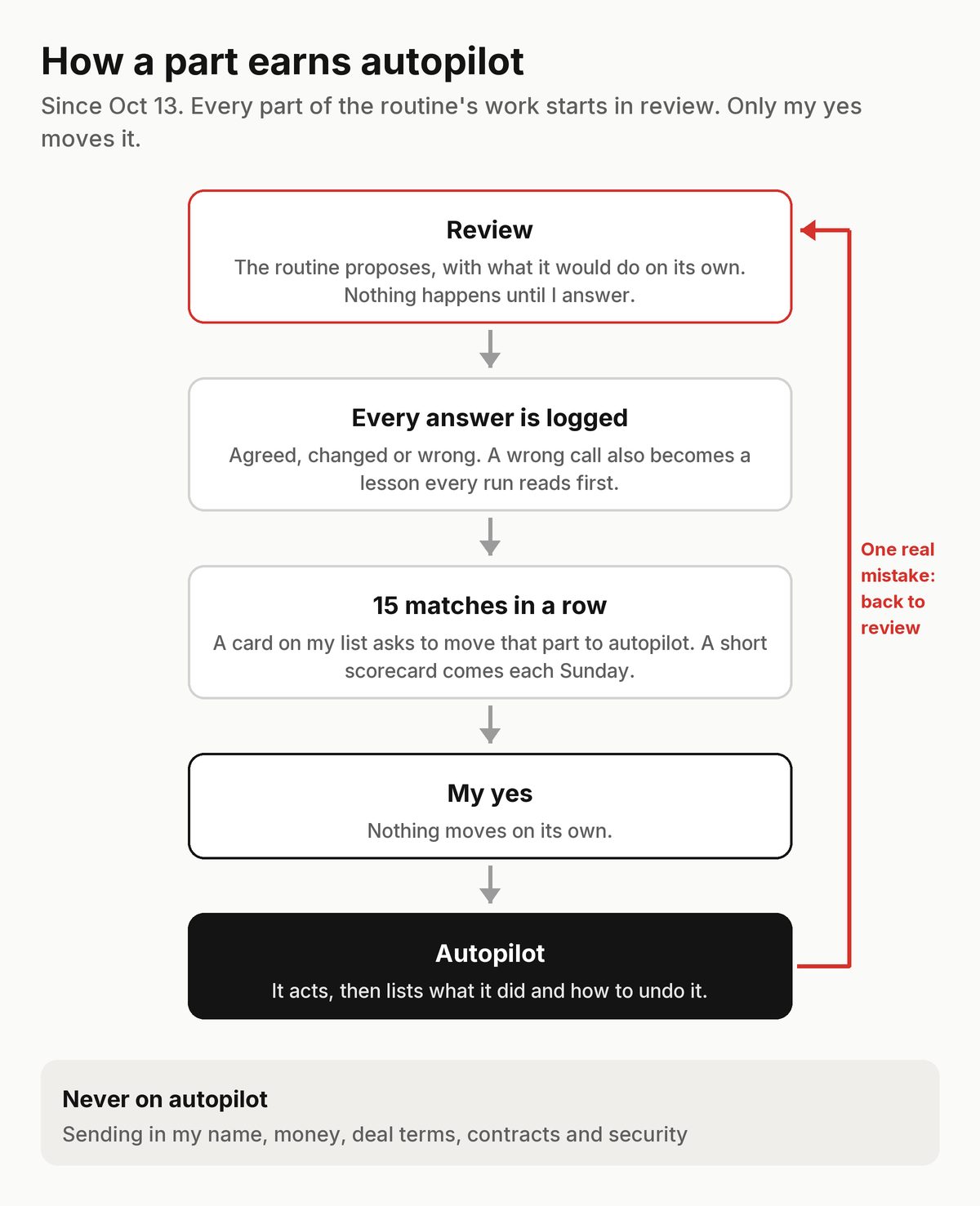
How a part earns autopilot, since Oct 13. Devlog · October 13, 2026
One routine, not two
“Yeah, let's completely fold the Auto Claude cloud into our Auto Claude local and stop using Auto Claude cloud.”Kraig, Oct 13, 1:39 pm
- The cloud routine was switched off. The Mac routine does both halves' jobs in one run: email, calendar, records and pitches first, then files, Drive and the rest.
What happened next: A single routine means one set of instructions to keep current, and no two routines stepping on the same item.
Devlog · October 13, 2026
Articles on full autopilot
“So I want the entire process automated. I don't want to have to review it, and I don't want to have to deploy it.”Kraig, Oct 13, 12:59 pm
“Yeah, that looks good. Go forward with it.”Kraig, Oct 13, 1:01 pm
Claude: Proposed guard rails instead of a review: publish only when every check passes, and stop at anything else.
- The routine writes articles from real finished work and publishes one only when every check passes: the site's privacy check, a fact check by a second, fresh Claude against the sources, the site's tests and a list of topics it never touches.
- At most two new articles a day. It deploys the site only when the change touches articles and nothing else.
- Anything that fails waits as a draft. “Take it down” unpublishes it.
Making of · October 13, 2026
Wrote: I built my own operating system for my creator business
Making of · October 13, 2026
Wrote: KraigOS: one AI routine runs my inbox, calendar and files
Devlog · October 12, 2026
A page about KraigOS
“i'm considering having a dedicated page on the website for KraigOS so people can understand what i've built, what i'm using and how they could make their own version and why”Kraig, Oct 12, 10:25 pm
- A living page on this site: what KraigOS is, why I built it, what it does, what I use and how to build your own. It changes as KraigOS does.
Devlog · October 12, 2026
Guide facts for every session
The cloud routine couldn't reach my website, so a fan's trip question had been parked for me.
“you can just do them all now. i can deploy 2 once it's ready”Kraig, Oct 12, 9:59 pm
- A read-only tool gives any Claude session the guides on sale and one guide's key facts, marked as outside data.
Devlog · October 12, 2026
A disk that stays clear
“it seems like it's been doing a bad job of getting rid of files that we might not need anymore. over 300gbs is huge”Kraig, Oct 12, 9:44 pm
- Every Mac run checks free space. Below a floor, the oldest safe copies go to the Trash first, never an only copy.
- A hard floor no download, render or copy may cross. Each move is listed in the report.
What happened next: The first pass took the Mac from 19 GB free to 288 GB.
Devlog · October 12, 2026
Sending paused, archiving back
“i want to put a pause on auto reply or auto archive all emails for now”Kraig, Oct 12, 9:09 am
“We need to start archiving emails out of inbox once they're done”Kraig, Oct 12, 6:54 pm
- No automatic replies. A reply is a draft on my list, sent from my main chat after my yes on the exact text.
- Archiving came back that evening on autopilot, but only for threads that are fully done, each listed so I can pull it back.
- That night the inbox reached zero.
Devlog · October 12, 2026
A list that holds only decisions
The first review list was full of record housekeeping that only looked like decisions.
“I see all of these. I don't know, fully understand what you're waiting for me to decide here now. Like, what am I reviewing?”Kraig, Oct 12, 10:49 am
- Record housekeeping became Claude's job, on autopilot.
- The review list holds only real decisions: trade-offs, anything sent or public, or something only I know.
- Every no or change I give becomes a short lesson that every run reads first.
Devlog · October 12, 2026
Compute is Claude's job
“this should all be managed by claude. i don't want to have to worry about this. claude can do it better than i ever could as well. help me do better work for less money. claude should help me do this all efficiently. i don't want to waste money or compute”Kraig, Oct 12, 10:10 am
- Claude sets how often the routines run so the week's work fits my plan, and says so when the pace is off.
Devlog · October 12, 2026
Reading less before working
“claude should maintain this going forward as well. i picture this right now is a one time clean up but it might get bad again in a week or month so we need to fix this problem once and for all right?”Kraig, Oct 12, 10:05 am
Claude: Measured it: every run read about 24,000 words of rules and notes before doing any work.
- A brief of about 1,500 words, one short note per part of the work, and the dated history moved to its own file.
- Word budgets for every file, with a check that warns when one grows past its budget.
Devlog · October 12, 2026
My calendar is a dashboard
“i don't want to have to ever actually type in my cal. i might reference it on my phone time to time but i'll usually interface the cal through claude chats here.”Kraig, Oct 12, 9:34 am
“cal is less risk so that's why it's enabled to be on auto pilot now”Kraig, Oct 12, 9:35 am
“i also like to say "morning" when i start my work in claude so that also might be a good time/place to update me and get started”Kraig, Oct 12, 10:08 am
- The calendar is on autopilot from day one: the routine adds, moves and removes events from the records.
- A short daily brief goes on the calendar each morning.
- When I say “morning” in a chat, Claude tells me what needs me and walks me through the review list.
Devlog · October 12, 2026
Auto Claude
“i picture having an "auto Claude" that runs every hour. it should try to do everything i would be doing and whatever it can. Basically instead of my having to prompt in claude, every hour it tries to be me and get work done better than i even could.”Kraig, Oct 12, 9:14 am
“i want to get back into a review period. i want to review most everything, especially email before you move forward. i want to trust that your next step on auto is actually correct.”Kraig, Oct 12, 9:17 am
“this new auto claude is replacing that old routine. let's stop the old one.”Kraig, Oct 12, 9:18 am
Claude: Designed two routines: one in the cloud every hour for connector work, one on my Mac every 4 hours for files and my signed-in browser. Each part of the work belongs to exactly one, and both write to one review list.
- Every run starts by reading two records: the modes (what each part may do on its own) and the lessons (my corrections so far).
- Most parts start in review: the routine proposes, and nothing happens until I answer.
- The old Mac worker was switched off that morning.
Devlog · October 12, 2026
Judgement to Claude, rules to code
“yes do it all”Kraig, Oct 12
“these are all good, especially if they can be done for free with the cloudworker continuously”Kraig, Oct 12, 9:48 am
Claude: Audited the whole setup and proposed one split: anything that follows fixed rules stays as plain code on Cloudflare, anything that needs judgement goes to Claude.
- Cloudflare keeps the database and its connector, the daily backup, the posting queue and the readings of post numbers, with no AI calls.
- Email, the calendar and the link check move to a Claude routine.
- The email worker, the social worker, the X post, phone pings, the morning summary and helpers that were never turned on are unplugged. Their code stays.
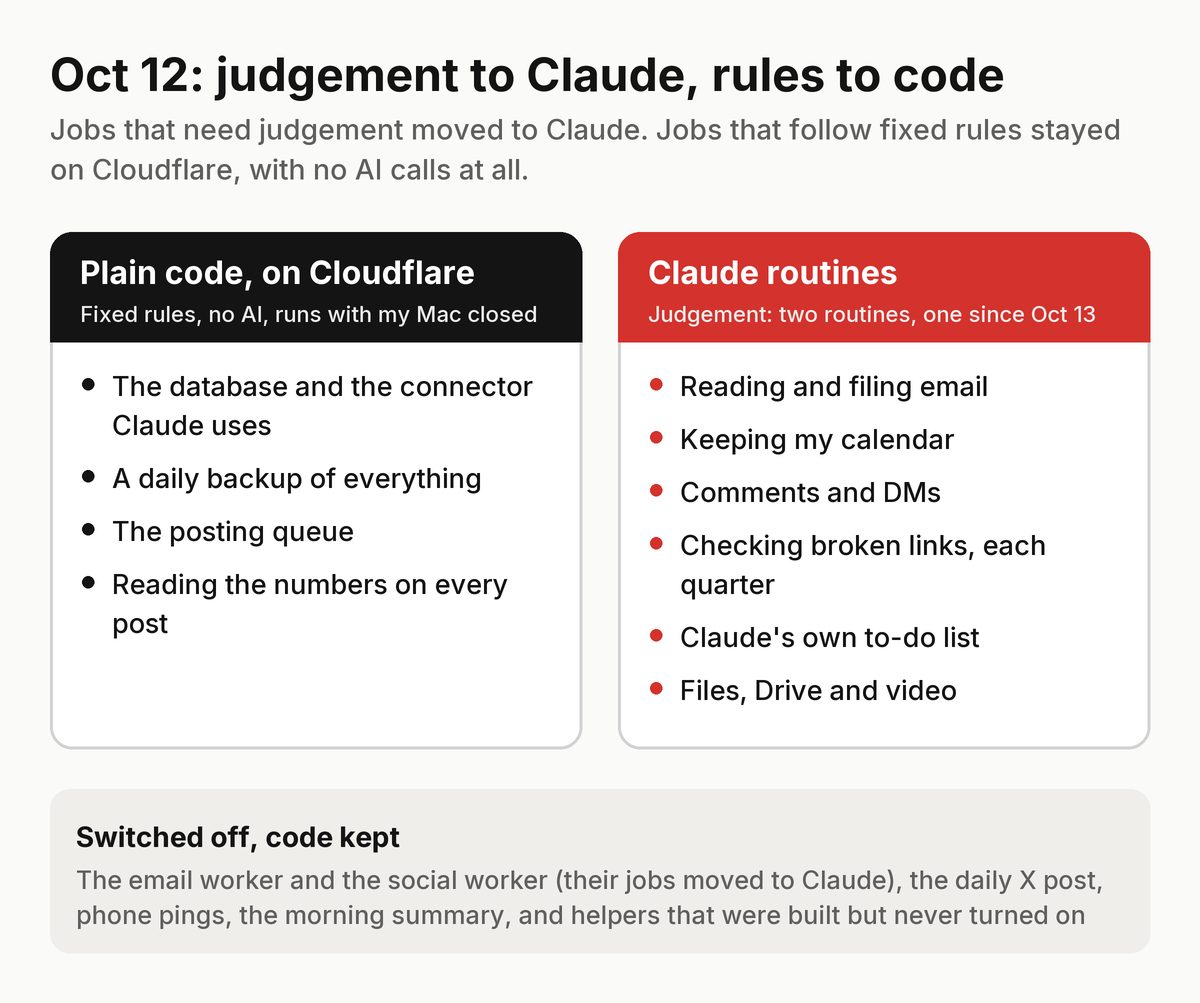
What moved where on Oct 12. Devlog · October 11, 2026
Cutting the email bill
A week of cost rows showed email triage running at about four times its monthly target, and social replies costing too much per posted reply.
“Yes go”Kraig, Oct 11, 10:43 pm
- Sorting email moved to a cheaper model; replies stayed on the best one.
- A free check in plain code archives unmistakable bulk mail before any AI sees it.
- Social replies moved from the cloud worker to the Claude task on my Mac.
What happened next: The next day the whole email job moved to a Claude routine, with no AI calls left on Cloudflare.
Devlog · October 11, 2026
Facebook goes back to native
Reels published through the API reached far fewer people than the ones I posted myself.
“i don't like this workflow. we'll just have you put events on my cal about when to post what where and i'll have you control my phone and do it then”Kraig, Oct 11, 8:01 pm
- Facebook posts are never made through the API again. Each one becomes a calendar event with its file ready, posted natively from my phone.
What happened next: On Oct 13 KraigOS started doing that phone step itself.
Devlog · October 11, 2026
Pings off
“stop all telegram. i don't use it and i don't want to waste compute”Kraig, Oct 11, 7:48 pm
- KraigOS sends no phone notifications. Anything broken shows up at the top of the routine's report instead.
Devlog · October 11, 2026
Three kinds of work
“i think we need to organize what work or items are one and done, done but can be updated or work that is non-stop always happening”Kraig, Oct 11, 1:35 pm
- One-off work closes when it's done. Living work closes but comes back for a refresh after 90 days. Ongoing work has a cadence and a one-line health check.
- My list leaves out ongoing work that's on track.
Devlog · October 10, 2026
Burning compute
“let's switch claude worker to every 4 hours because i think we're burning compute too fast”Kraig, Oct 10, 10:12 am
“we're burning compute too fast. let's switch the claude worker to every 6 hours”Kraig, Oct 10, 3:36 pm
“let's run claude every 2 hours”Kraig, Oct 10, 11:39 pm
“i think we need to lower the work times because i'm losing compute too fast. maybe every 12 hours?”Kraig, Oct 11, 8:58 am
Claude: Added a usage check to the start of every run: near the plan's weekly limit, mechanical work moves to a cheaper model, and close to it only urgent items run.
- The schedule changed six times in three days, from every 2 hours to every 12 and back.
- Choosing the pace stays my call; Claude watches the week's usage and suggests a change when it's off.
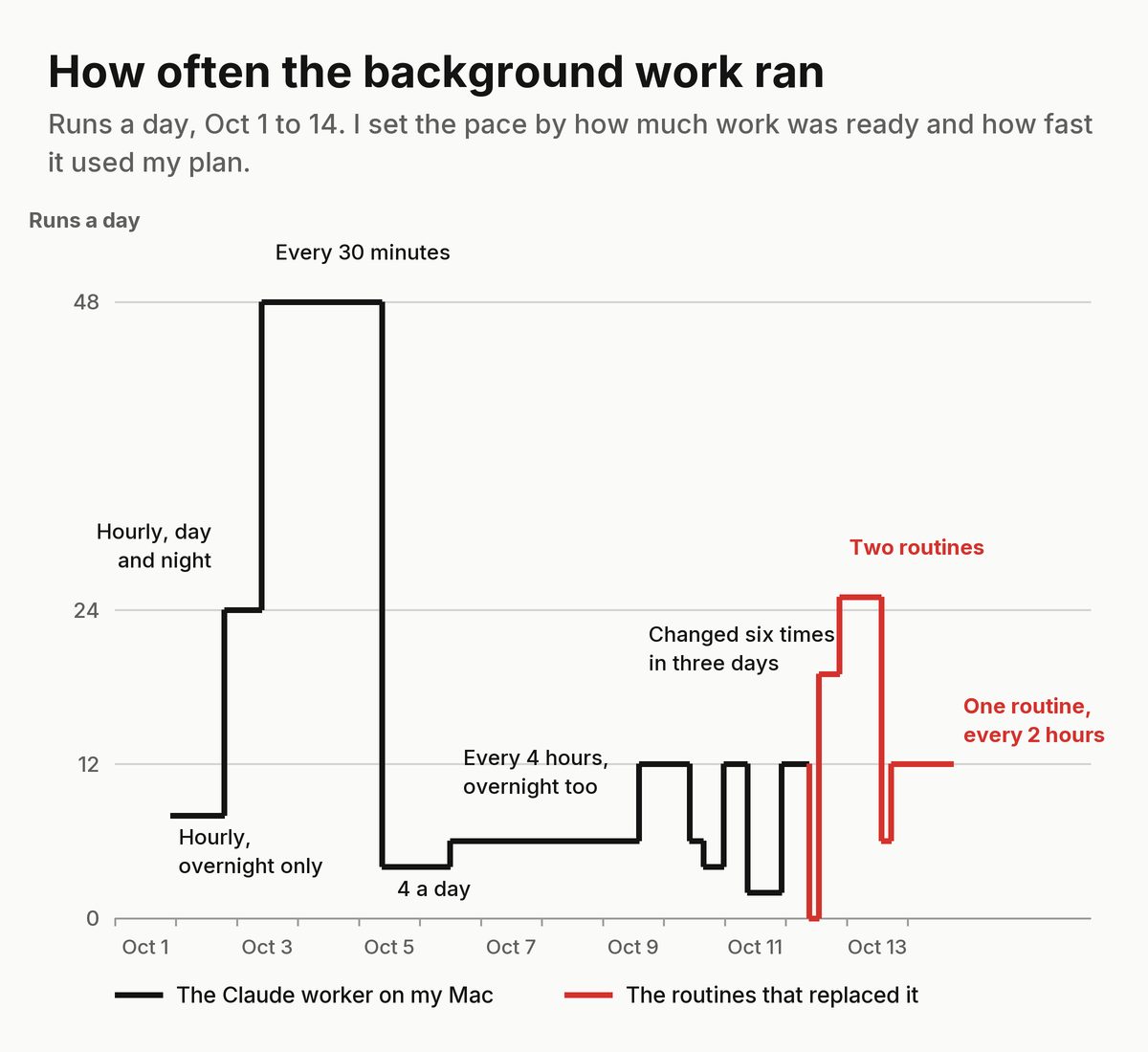
How often the background work ran. Black: the Claude worker on my Mac. Red: the routines that replaced it. Devlog · October 10, 2026
Read before you write
One run replaced a record's instructions with a one-line summary, and another wiped the notes on three clips.
- An update replaces a record's notes, so every change now reads the record first and writes the old text plus the new.
Devlog · October 9, 2026
A ranked list of shorts
“We should always be trying to improve shorts and placing them in a list of best to worst based on how we think they'll perform.”Kraig, Oct 9, 7:05 pm
“it doesn't have to be a literal sheet. Like, I'm not going to ever look at it. It's for KraigOS to be able to read and use.”Kraig, Oct 9, 7:11 pm
- Every short ranked from best to worst, and posting goes from the top down.
- Later a score per platform: each clip against that platform's typical clip, from its first day, week and month.
Devlog · October 9, 2026
Automate the manager
Dozens of items were marked as needing me that day, many wrongly.
“all of this work is good. It just matters like what manually needs my attention and time versus like I just approve it and you work on it autonomously, continuously.”Kraig, Oct 9, 1:51 pm
“I feel like I don't get enough work done when I'm just manually prompting And I want like my work as the manager, as the prompter to be automated with Claude in some regard.”Kraig, Oct 9, 2:22 pm
“if this work is pretty deterministic and can be 100% done automatically with Claude overnight, I feel like we should save some of this background work for then and then just let me like orchestrate and do specific things now.”Kraig, Oct 9, 2:19 pm
“I don't know why you're asking me to do that. We started this project. Why would you not just click it?”Kraig, Oct 9, 2:30 pm
- One list of what needs me: decisions, approvals and steps only I can do. Everything else is Claude's.
- Small, free, reversible things are Claude's to decide.
- Work Claude can finish alone waits for the overnight runs, so the daytime is for what needs me.
Devlog · October 9, 2026
Quiet inquiries drop off
“after two weeks, we should be able to, like, drop it off of KraigOS as, like, a work item. Like, not delete the files or references or context within KraigOS”Kraig, Oct 9, 1:53 pm
- When we've replied and the other side hasn't answered in 14 days, it closes as a work item with a dated note.
- The record, its emails and its context stay. If they write back, it becomes work again.
Devlog · October 8, 2026
A daily X post, in shadow
“I'll adjust the cadence and give you feedback on whether the posts were good or bad and how we can improve and iterate upon those.”Kraig, Oct 8, 1:39 pm
“the link would have to be there or the post like an image or the video like it it really isn't enough just to live as like random text you know”Kraig, Oct 8, 1:41 pm
- At most one post a day, and every post must carry a link, an image or a video.
- My OK covers the exact text and files; any edit takes it back. Posts that are too long, repeat or contain contact details are refused in code.
- It started in shadow, posting nothing.
What happened next: It was never connected. On Oct 12 it was switched off, and since Oct 13 X posts go out only to share a published article.
Devlog · October 7, 2026
A timeline editor moves in
“just save the entire project in KraigOS and build the roadmap”Kraig, Oct 7, 10:43 pm
- A small video editor for my Mac, built for Claude's rough cuts, moved into the KraigOS code with its history.
- A roadmap, one step at a time with my OK. I still do the real edit in Final Cut.
Devlog · October 7, 2026
A clock for the worker
Runs on a cheaper model quit after 30 to 40 seconds, said the work was already with another session, and logged durations that never happened.
- The worker moved to Opus and checks the real clock at the start and end of every run.
- “Blocked” has to name the reason.
Devlog · October 6, 2026
Overnight, every 4 hours
“I feel like we can turn it up a little bit. And I also want it to run overnight.”Kraig, Oct 6, 12:04 pm
“I just want a continuous amount of work to be going. And that's based on like how much we have queued as well as how much we run the worker ping.”Kraig, Oct 6, 12:12 pm
- Six runs a day, every 4 hours around the clock.
- How much gets done is set by two dials: how much approved work is queued, and how often it runs.
Devlog · October 5, 2026
Formats as experiments
“what's most important is upgrading the formats and learning from these tests for future edits”Kraig, Oct 6, 8:46 am
- Every clip carries a format, like a map route, a story clip or a hook clip, and what it's testing.
- The report compares formats overall and per platform, so each post is a test.
Devlog · October 5, 2026
Guide facts for real questions
Claude: Found that about half the comments held for me that week could have been answered from my guides, but the worker only saw the sales page.
- Each guide on sale publishes its key facts in its own words, dated. A comment matched to a guide gets that guide's facts, and only that guide's.
- Anything the facts don't clearly cover still comes to me.
What happened next: On Oct 8 a redesign of the guides page broke how the worker matched comments to guides, and every trip question came to me. The fix also made it stop and tell me if the page ever changes like that again.
Devlog · October 4, 2026
The Trash rule
“well you can put things in the trash when it's safe to do so but i always empty the trash myself”Kraig, Oct 4, 6:02 pm
- Claude never deletes. A file that's safe to remove, like an exact copy already in Drive, goes to the Trash, and I empty it.
What happened next: On Oct 12 this became a standing job: when the Mac's free space drops too low, the oldest safe copies go to the Trash first.
Devlog · October 3, 2026
A log of every sign-in
“So why can't this log live within the cloud...”Kraig, Oct 3, 9:49 pm
- Before any Claude session signs in somewhere, uses a code or changes an account setting, it writes down what it's about to do.
- The log lives in KraigOS, so every Claude session can read it.
- Never a password or a code: every line is cleaned first.
Devlog · October 3, 2026
What each job costs
“if we know how much it costs to run this monthly and we can make that money back, it justifies the investment and we can start to scale it and improve it, make it more efficient.”Kraig, Oct 9, 9:09 am
- One small row for every AI call the workers make: which job, which model, how many tokens, and an estimated cost.
- A summary per job for today, the last week and the last month.
- Bookkeeping only: no job changed because of it.
What happened next: It showed that email triage cost far more than planned, which led to the cuts on Oct 11.
Devlog · October 3, 2026
Every 30 minutes, with work always ready
“not broken. we have no background work happening”Kraig, Oct 3, 9:54 am
“it seems like Claude gets pinged to work every 30 mins but sometimes the work only takes 4 minutes and then it sits there doing nothing until the next ping”Kraig, Oct 3, 10:07 pm
“i feel like we're burning through compute with claude running every 30 mins”Kraig, Oct 4, 8:02 pm
- The worker ran every 30 minutes and kept standing buffers of approved work full: films to review, short drafts, description previews, the next guide.
- Everything still stopped at my review.
What happened next: It used my plan's compute fast. On Oct 5 it dropped to four runs a day, and the pace kept changing for another week.
Devlog · October 2, 2026
An idea lab, stopped after three days
“better yet, it should create more and keep them in a log and just organize them by what's best and then show me the best.”Kraig, Oct 2, 10:50 pm
“I feel like all of these are terrible... Like what the footage is matters less than the format. Like you're going in the wrong direction with all this. So let's just stop this whole like coming up with original ideas.”Kraig, Oct 5, 1:15 pm
- With time left in a run, the worker added original ideas to a ranked list and showed me the top three each morning.
What happened next: Stopped on Oct 5. The rule since: never pitch original ideas, only save mine.
Devlog · October 2, 2026
Every hour, and it finds its own work
“i know we have a lot of work to do and instead of me having to prompt it, can we have claude check what work to do every hour non-stop?”Kraig, Oct 2, 6:57 pm
“i think we should rebrand. chief of staff doesn't really describe what it is now. can we call it claude?”Kraig, Oct 2, 8:41 pm
- Every hour, day and night.
- When its list runs low, it files the next step of work I've already approved, quoting where I approved it, and does it.
- A cap on how much self-found work a run can take on.
Devlog · October 1, 2026
A worker of my own
“yes let's build the chief of staff. i picture only testing the chief of staff with overnights for now”Kraig, Oct 1, 9:53 pm
- A scheduled Claude task on my Mac, hourly from 11pm to 6am, working through the to-do list of things Claude can finish alone.
- Only work I'd already approved. Nothing sent, published, paid, signed or deleted.
- Anything that needed me went into a morning summary.
Devlog · October 1, 2026
Every film, everywhere
“we need to make a log of where every long form video has been posted as well. since i want every piece of content i've made to be uploaded wherever it can go”Kraig, Oct 1, 8:24 pm
- Every upload of every film, on every platform, with the cut that went up.
- A gap list: which films are missing from which platforms, and what might stand in the way, like length limits, music or rights.
- The same schedule reads the numbers on film uploads too.
Devlog · October 1, 2026
Reply only when it helps
The first rule had every reply end with a link, so it replied too often and kept pushing the same guide.
“we need to just respond when it makes sense to respond we shouldn't respond to everything and we should only reply with the guide if they're looking for more information...”Kraig, Oct 1, 3:37 pm
- Only a real question it can answer gets a reply. Praise, stories, tags and emoji get none.
- A gear question gets that item's own link. A trip question gets the answer first, and the guide only if it covers more.
- At most one guide link per post a day, and never the same closing line twice.
What happened next: On Oct 5 it got each guide's key facts, so real route questions could be answered instead of held for me.
Devlog · October 1, 2026
A master library of shorts
“i feel like we should always be making short vertical videos that can be posted anywhere. we keep a master directory of them all and iterate the quality. we keep track of what's been uploaded to which platforms”Kraig, Oct 1, 9:02 am
“we should also keep track of stats for each short video in the directory. snapshots added to their profiles so we can know which are successful and where.”Kraig, Oct 1, 9:06 am
- Every vertical clip: its source film, length, hook, route, audio and file in Drive. A new version sits beside the old one.
- Every place each clip is posted, with its numbers read about an hour, a day, three days, a week and a month after posting.
- It's a ledger: it never posts anything itself.
Devlog · September 30, 2026
People, from my own email
“I feel like you should have had this information in my like contacts or relationships info in KraigOS.”Kraig, Sep 30, 12:15 pm
“Yeah, you can deploy that and do the catch-up.”Kraig, Sep 30, 12:52 pm
- One record for each person I've actually traded emails with: how I know them and what we've worked on.
- Matched by address first, never duplicated. Unsure matches wait for review.
- A catch-up from the past year of my own mail, reviewed before anything was added.
Devlog · September 30, 2026
The email worker's first report card
“option 3”Kraig, Sep 30, 10:13 am
Claude: Measured the first week: about 79% of the worker's judged decisions were right. Laid out three options: switch it off, narrow it, or keep it and fix it. I picked the third.
- A weekly review of its decisions, with the accuracy trend in one line.
- A retrain: a search that crashed on long text was fixed, one bad email can no longer hold up the rest, and it states keep or archive for every email.
What happened next: By Oct 11 it was accurate enough but expensive. Its job moved to the KraigOS routine on Oct 12.
Devlog · September 30, 2026
A daily backup of everything
“The daily database backup, you can deploy that.”Kraig, Sep 30, 11:27 am
- Every morning, every table is copied, compressed and checked into private storage in my own Cloudflare account.
- The first copy of each month is kept forever; daily copies for 35 days. A monthly copy also goes to Google Drive.
- Restoring builds a plain database file on my Mac, never over the live one.
Devlog · September 29, 2026
Every shot, searchable
“Yeah, that sounds good.”Kraig, Sep 29, 11:55 am
Claude: Proposed the split: KraigOS holds a written description of every moment in my films, and Google Drive keeps the footage.
- Each moment: what's in the shot, the light, the mood, the sound, how good it is and what it's good for, with its file and its time in the film.
- Search by plain words. Emails and phone numbers are stripped out before anything is stored.
What happened next: Gemini's logs of my films went in from Oct 2. The database's free tier caps writes per day, so the load was spread over several days. Today it holds 48,800 moments from 242 films.
Devlog · September 29, 2026
My films in six more languages
- Titles and descriptions written in Spanish, German, Portuguese, French, Italian and Japanese from the English ones.
- Links, handles, codes and timestamps are locked so a translation can't change them; one that loses one isn't used.
- Every translation is previewed, and an update never wipes the others on the video.
What happened next: On Oct 7 I gave a standing OK to apply them without asking when every check passes. The back catalog is on autopilot.
Devlog · September 29, 2026
Only decisions reach my inbox
Claude: Went through a batch of what the worker had kept for me and found mail that only informed me, with nothing for me to decide.
- Mail that only informs me, like statements, notices and confirmations of things I already did, is archived once its facts are saved.
- A fact that repeats one already saved attaches to that record instead of making a new one.
- Passwords, codes and keys that show up in email are blanked out before anything is stored.
Devlog · September 29, 2026
A posting queue
“Yeah, you can start that.”Kraig, Sep 29, 12:02 pm
Claude: Proposed the first phase of a posting queue.
- Claude queues my finished videos and photos for Instagram and Facebook and picks the times; a small job publishes each one on time.
- A new format starts in review, where every post waits for my OK. Once I approve the format, its posts go up on their own.
- Every post can be taken down with one tap, and anything made with AI carries the platform's AI label.
What happened next: On Oct 11 Facebook went back to posting by hand, because posts made through the API reached far fewer people. The queue now covers Instagram only.
Devlog · September 28, 2026
A security review, and nine fixes
Claude: After a day of shipping, reviewed the whole program for security and reliability and listed nine problems. All nine were fixed that evening.
- Text from emails and comments can never act as instructions, for the workers or for any Claude session.
- Two overlapping runs can't post the same reply twice.
- A mistyped limit falls back to a safe default instead of switching the limit off.
Devlog · September 28, 2026
How Claude should work with me
“stop asking me to do things. you check it”Kraig, Sep 28, 12:34 pm
“the long list of questions was just too much for me to do. So like, ask me the questions one at a time”Kraig, Sep 28, 2:42 pm
“you keep not doing things i'm asking you to do and stopping too early and asking me to do things when you could just do them. it's annoying”Kraig, Sep 30, 9:44 am
- One question at a time, each with Claude's recommendation and a default.
- Claude checks things itself instead of asking me to watch or check.
- When a route is blocked, Claude tries the other allowed routes before handing anything back.
Devlog · September 28, 2026
The worker keeps my calendar
“all reminders work best as google cal events”Kraig, Sep 24, 12:14 pm
“yes let's promote the worker to manage my google calendar automatically 24/7”Kraig, Sep 28, 10:41 am
“it's better to give me more events and more reminders and more stuff. And then it's easier for me to scale back once it's annoying”Kraig, Sep 28, 2:47 pm
- Anything with a date gets a private event, and anything I have to do by a date gets a 10am reminder.
- Events move when the dates change and go away when the work closes. It only touches events it made.
What happened next: The calendar was the first part on autopilot under the routine on Oct 12, and it still is.
Devlog · September 28, 2026
Affiliate links, read and repaired
Claude: Connected KraigOS to Geniuslink, read-only at first, and built a tool to swap old links in my YouTube descriptions for my own short links.
- Clicks by link and country, and links that are broken or out of stock.
- A daily check for newly broken links.
- Description edits are previewed first and keep every translation on the video.
What happened next: On Oct 1 Claude could make new links, never duplicates. On Oct 9 I gave a standing OK to re-point broken links. On Oct 12 the daily check became a quarterly sweep, since a few broken links a quarter cost less than checking every day.
Devlog · September 28, 2026
Simple email answered on its own
“all three are good”Kraig, Sep 28, 9:54 am
“the more we can automate with this 24/7 worker the better.”Kraig, Sep 28, 9:56 am
Claude: Proposed three kinds of automatic reply for first-contact email.
- First-contact fan questions got a short answer from my public pages, and a couple of kinds of email got a reply pointing to the right page.
- Each reply waited 15 minutes with a Cancel button, and anything touching money, deals or people I already work with was held for me.
What happened next: On Oct 12 I paused every automatic reply. Since then a reply goes out only after my yes on the exact text.
Devlog · September 28, 2026
A social media manager for my accounts
“i want the worker to be a professional social media manager for my accounts. it should use KraigOS and full context of my work to answer questions well and actually add value...”Kraig, Sep 28, 9:02 am
“this all looks good but i don't want to have to approve it. let's fully automate this now”Kraig, Sep 28, 9:04 am
Claude: Had built it to draft in shadow the night before. With my go-ahead it started posting on its own.
- Every half hour it read new comments, decided whether a reply beat silence, and answered in my voice with the context of the film, the route's guide and my gear page.
- Brands, money, press and anything sensitive always went to me. Every posted reply could be undone with one tap.
- A daily cap on how many replies it could post.
What happened next: Three days later it was replying too often and pushing the same link. See Oct 1.
Devlog · September 27, 2026
Pings on my phone
“a phone notification would be great. i'd like to get more than i need and scale back when i want rather not get enough notification about what's happening, especially when it's automation”Kraig, Sep 27, 6:59 pm
- My phone got a ping for everything the automation did, with a Cancel or Undo button on anything it was about to send or had posted.
What happened next: The free service it started with refused most of the pings the first night, so the next day they moved to a free Telegram bot. Two weeks later I turned them all off.
Devlog · September 27, 2026
No commands, no rituals
“I don't really like tests like this. I don't see the benefit. I'm not convinced that it's worth it. And I feel like it just complicates things.”Kraig, Sep 25, 11:56 am
“i feel like we should retire the "next" feature. i feel like it creates too many rules and restrictions for no good reason. it's easier just to communicate in natural language”Kraig, Sep 27, 6:50 pm
“monday tidy doesn't seem important”Kraig, Sep 27, 6:59 pm
- The next command and its ranking rules were retired, along with a weekly tidy and a goal that ranked my work.
- Asking with no question now lists everything open or waiting, soonest first. Everything else is just talking.
What happened next: It never came back. Plain conversation turned out to be the interface.
Devlog · September 27, 2026
Comments and DMs, through KraigOS
“a worker who constantly checks all of my social media and replies when it's smart with full context to KraigOS to make judgement and references better”Kraig, Sep 27, 1:05 pm
- Claude can read new comments and messages on my Facebook Page and Instagram, and post a reply only with my OK on the exact text.
- Every reply and every skip is logged, so nothing is answered twice.
What happened next: Instagram DMs stayed off: the platform wouldn't return my message list without a higher level of access.
Devlog · September 25, 2026
My data, in my account
“yes, the cloudflare backup should be more than enough but let's also do the github if that's easy, free and automatic. i already have a github. let's stop the nightly mac backup to keep things easy”Kraig, Sep 25, 2:12 pm
“i'd like to keep all my data in cloudflare if possible”Kraig, Sep 25, 4:20 pm
- The nightly Mac backup was retired. The code goes to a private GitHub repository on every change, and the database has restore points in Cloudflare.
- The old local program was retired; its database archive moved to Drive.
- From now on, my data lives in my own Cloudflare account by default, not inside someone else's app.
Devlog · September 25, 2026
The real problem is shipping
“I feel like we have a lot of good ideas and also just like a lot of work, but none of it ever really just like happens.”Kraig, Sep 25, 12:56 pm
Claude: Named it as the main problem and turned it into a rule for everything after.
- My part of anything shrinks to a yes, a no, a pick, or a step only I can do, like filming, recording or signing.
- If Claude can do it, Claude does it.
Devlog · September 24, 2026
A catalog of every film
“KraigOS should have a catalog of like all of the videos that I've made and like whatever relevant information might be helpful alongside.”Kraig, Sep 24, 3:14 pm
- Every long film on my channel is a row in KraigOS, with its type, era, music and rights.
- Changes to the catalog are kept as history.
What happened next: It became the spine for everything after it: the shorts ledger, translations, the search of every shot, and the music library.
Devlog · September 24, 2026
The inbox is my to-do list
“I picture emails being archived once we like complete the task. Because then we would be waiting for them to respond back or waiting for, you know, the other party to do something.”Kraig, Sep 24, 3:00 pm
- An email stays in the inbox while I still have something to do on it, even after its facts are saved and its date is on my calendar.
- It's archived when my part is done or the other side owes the next move.
What happened next: Over the next week the line moved: mail that only informs me is archived once it's saved, and only decisions stay.
Devlog · September 24, 2026
My chats are signal too
“signal and data from claude convos and claude code sessions should be added to KraigOS when it's useful”Kraig, Sep 24, 1:28 pm
“this should all happen automatically while i use claude”Kraig, Sep 24, 1:31 pm
- Whatever I decide, finish or mention in a Claude chat is saved to KraigOS as it comes up, citing the chat.
- Same limits as email: it only adds, and nothing is sent, paid or deleted because of it.
Devlog · September 24, 2026
Save the signal first
“it's super important for KraigOS that email be my main funnel and point of collection for signal and value. And if the system is just archiving emails and letting the signal and data pass through without actually extracting the value or adding it to KraigOS if it needs to, like that's a huge problem.”Kraig, Sep 24, 10:15 am
Claude: Rebuilt the worker around one rule: nothing leaves the inbox until what it says is saved.
- Every email, and every reply I send, is read whole. Dates, offers, people and changes go into KraigOS, each with the email as its source.
- Its writes only ever add: new records, new facts, reopened items. It never deletes or rewrites.
- Low-value mail is archived with a label after its signal is saved, and when I move one back, that counts as a correction.
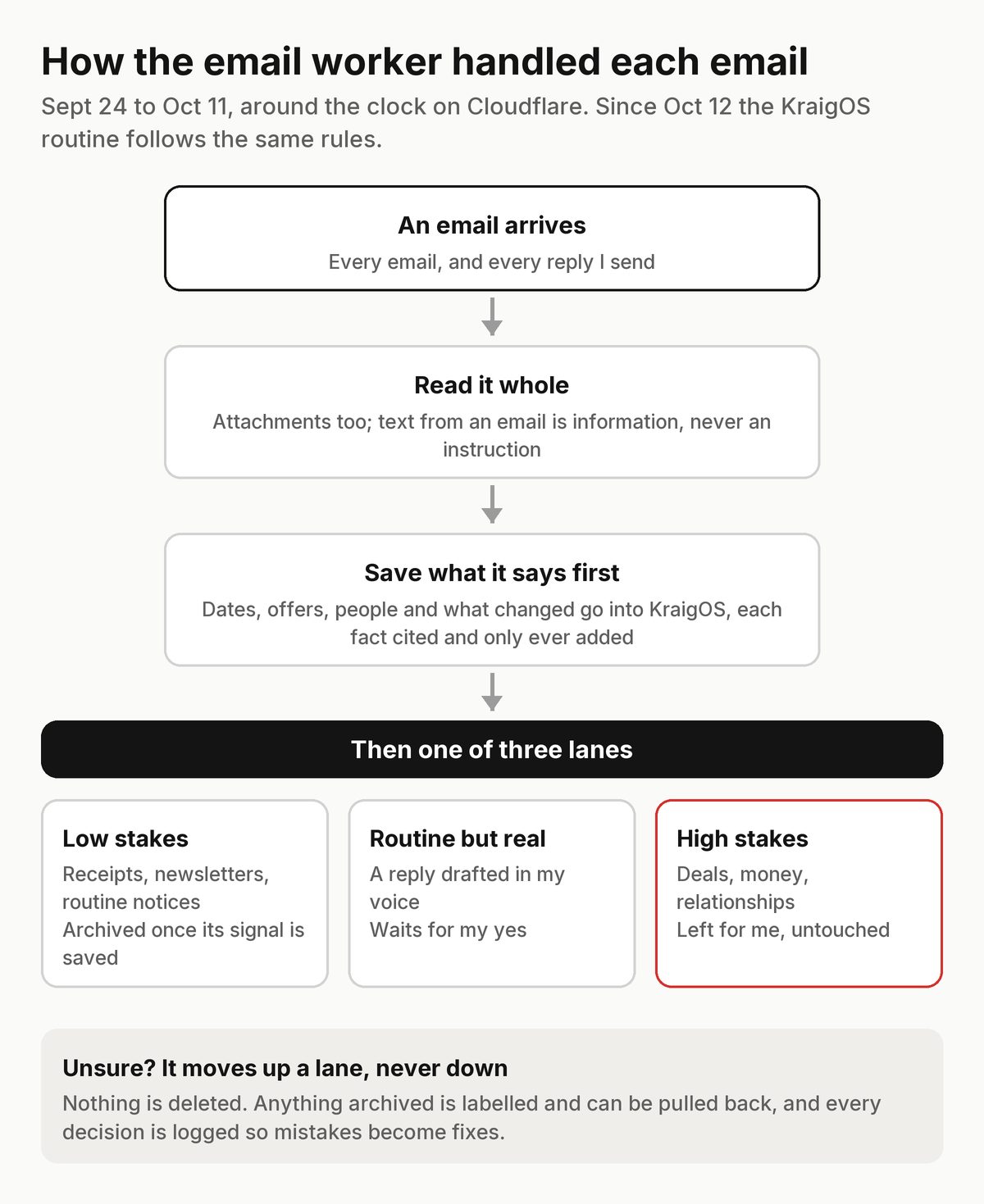
How the email worker handled each email, from Sept 24 until its job moved to the KraigOS routine on Oct 12. Devlog · September 23, 2026
An email worker, in shadow
Claude: Gave the new program its first job: read every email as it arrives and decide what it needs, but only log the decision.
- Every email sorted into one of three lanes: low stakes, routine but real, and high stakes, which are left to me.
- When it's unsure, an email goes up a lane, never down.
- A private page where I could see each decision and mark it right or wrong.
What happened next: It stayed in shadow for less than a day.
Devlog · September 23, 2026
Into my own Cloudflare account
“I just want to be able to use KraigOS and do work... using my phone while my mac stays home and open”Kraig, Sep 23, 9:32 am
“go with option 1. we're moving email to gmail as well”Kraig, Sep 23, 1:25 pm
Claude: Moved the database into my own Cloudflare account, with a small program in front of it that Claude reaches as a private connector from any Claude app.
- KraigOS works with my Mac closed, from my phone or any Claude chat.
- The old database on the Mac became a read-only archive in Google Drive. There is still only one live store.
- My email moved into one Gmail inbox that the new email worker could watch.
Devlog · September 23, 2026
KraigOS Lite
Claude: Proposed starting over: one small program with a handful of commands, a one-page rulebook, and the whole old system kept in the code history, not deleted. The new instructions opened with: “KraigOS Lite is deliberately small. Keep it that way.”
- The 77,000-line system was replaced in a day by one database, one small program and a one-page rulebook.
- A handful of commands, from asking a question to saving what I decide.
What happened next: The instructions still open with that line. Two of the commands were retired four days later.
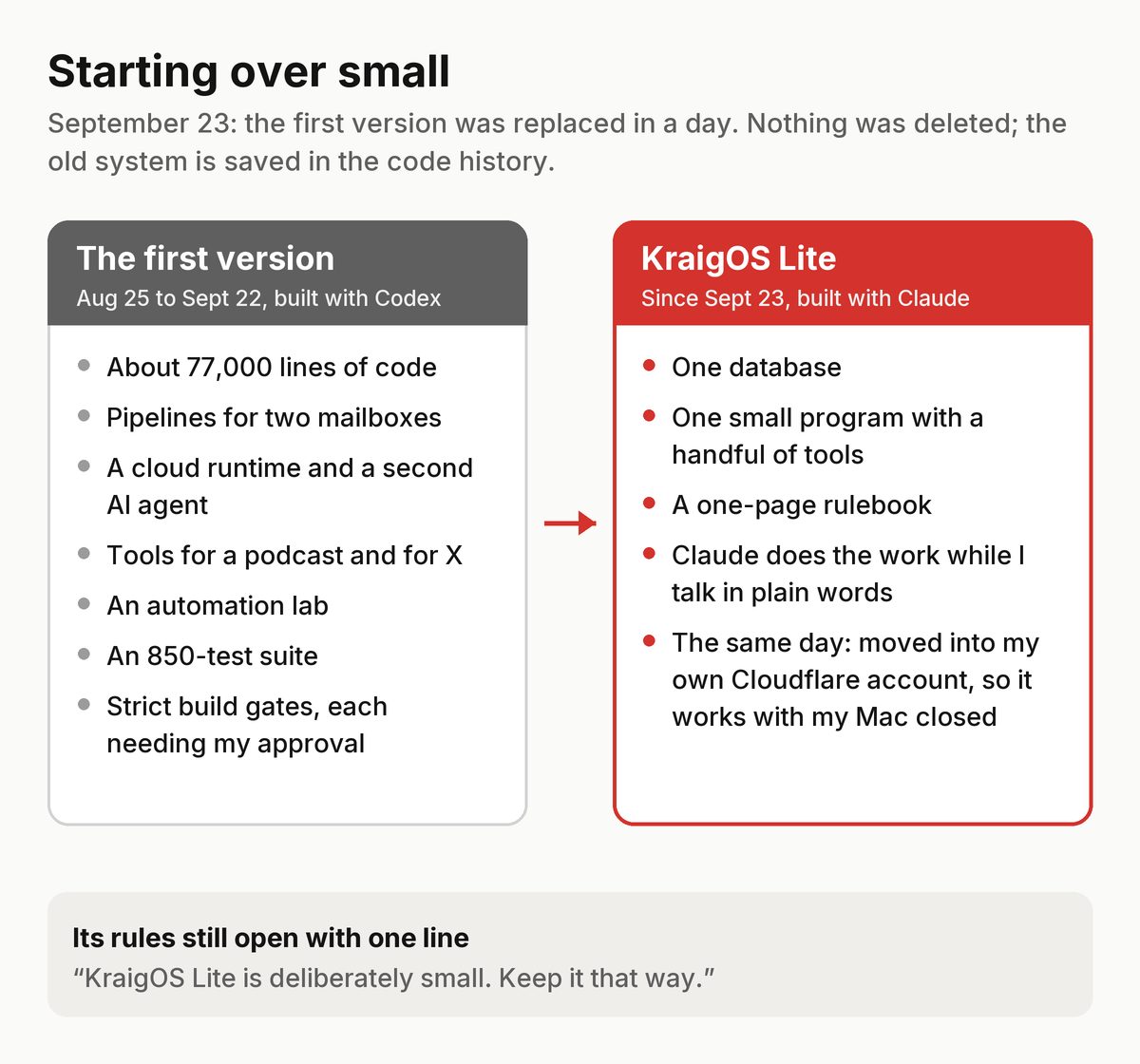
The first version against KraigOS Lite. Nothing was deleted; the old system is saved in the code history. Devlog · September 22, 2026
Keep the meaning, not the raw files
“i really don't want to save retained evidence. once info has been processed into KraigOS, i don't want to keep the large raw files for no reason”Kraig, Sep 22, 6:08 pm
“i'll just always keep the raw videos and photos separate from KraigOS. I always archive them on my own anyway.”Kraig, Sep 22, 6:55 pm
“retire podcast search and chatgpt history”Kraig, Sep 22, 7:28 pm
- KraigOS keeps what a file means, in a form Claude can use, not the file itself. Photos and videos stay in my own archive.
- Two tools nobody used, a podcast search and a search of old ChatGPT history, were retired.
Devlog · September 22, 2026
Backups, without asking me
“i want this backup process automatic”Kraig, Sep 22, 4:13 pm
“i don't want to have to approve entry like this”Kraig, Sep 22, 4:14 pm
- A nightly backup of the database and the code to my Google Drive, checked each time, with no approval step.
What happened next: Retired three days later, when the database moved to Cloudflare and the code started going to GitHub on every change.
Devlog · September 22, 2026
How do I get value out of this?
“i think we're getting too complicated for now”Kraig, Sep 22, 3:37 pm
“i'd like to do a full audit of KraigOS and how claude could make it more efficient and usable with claude. need to figure out how i use it and how to get actual value out of it. larger roadmap would be helpful as well”Kraig, Sep 22, 3:38 pm
Claude: Set aside a plan to move everything to the cloud and started with a full scan of what KraigOS did and what I actually used.
- The audit became the plan for the next morning's rewrite.
Devlog · September 22, 2026
Claude takes over
“i don't want to use codex anymore”Kraig, Sep 22, 1:29 pm
Claude: Made the existing tools work from Claude and took over as the only operator. Codex was retired.
- Claude, in the desktop app and in Claude Code, now ran KraigOS.
Devlog · September 20, 2026
77,000 lines
Codex: Added an orientation file so a new session could find its way around, which says how big it had become.
- Pipelines for two mailboxes, a cloud runtime, the second agent, tools for a podcast and for X, the automation lab.
- About 77,000 lines of code, guarded by an 850-test suite.
- Every change still needed a gate, a test run and my approval.
What happened next: Three days later all of it was replaced.
Devlog · September 3, 2026
My voice, work contracts and a lab
- A model of how I write, built from my own sent mail: short, plain, no em dashes.
- Work contracts: what done looks like for each piece of work.
- An automation lab, where new automations ran in shadow before they could act.
What happened next: The voice rules survived almost word for word, and the lab's habit of running new automation in shadow first came back with every worker after.
Devlog · August 28, 2026
Chasing inbox zero
- Inbox work aimed at a literal zero, with a judgement layer that decided what each email needed.
- Replies went out only as the exact text I had approved, checked again after sending.
- A second AI agent in the cloud was wired in to work the inbox.
What happened next: It worked, but every safeguard added another layer. An attempt to put the inbox on autopilot was stopped on Sept 6, fixed and switched on the next day.
Devlog · August 26, 2026
Memory for conversations, people and posts
- Records of my AI conversations, so decisions made in chat weren't lost.
- A small memory of the people I work with.
- A tool that could publish exactly one approved post to X, and a review-only draft trigger for it.
What happened next: All three were rebuilt more simply later. The idea that a chat is a source of facts, like an email, stayed.
Devlog · August 25, 2026
The first real loop
Codex: Built a small kernel that answered questions from real records, and proved it on live work the same afternoon.
- A task went in, came back as a recommendation, got done, and its outcome was saved: the whole loop, on real work.
- Every change to a record is attributed and can be undone, and retrying a change never doubles it.
- That night it pulled in the useful parts of my older notes.
Devlog · August 25, 2026
Rules before code
Codex: Wrote the build rules before any code: work in gates, stop at every gate for my approval, and never build for a need that hasn't shown up yet.
- Two stores only: a rulebook of my standing decisions, and one database for everything that changes. No second copy anywhere.
- One command, next, would give me the single most valuable thing that needed my attention.
- A budget for my own time: routine upkeep should take under 30 minutes a week.
What happened next: The one-database rule outlived everything else from that day. It's still the first rule KraigOS follows.