
KraigOS: the small AI system that runs my creator business
What KraigOS is, why I built it, what it does every day, what I use to run it, and how you could build your own version.
I make long films about hiking alone on YouTube and hiking guides to the routes in them. KraigOS is the system behind the desk work: email, deals, my calendar, files, posts and numbers. This page is the overview. It changes as KraigOS changes, and every note about it is listed at the bottom.
What it is
KraigOS is one database and a handful of tools that Claude uses while I talk in plain language. There are no commands. I say what I want in a Claude chat, and Claude answers from the records, my email, my calendar and my Google Drive.
The database holds facts, not rules: projects and to-dos, deals, people, dates and decisions, the catalog of my films, a ledger of every short and where it's posted, and a log of every shot in my films. Everything else has one home too: conversations in Gmail, dates in Google Calendar, files in Google Drive, code on GitHub.
I started it on August 25, 2026. The story of how it got here is in I built my own operating system for my creator business. The full build log, entry by entry, is the KraigOS devlog.
Why I built it
- Shipping is the bottleneck. In my words: "we have a lot of good ideas and also just like a lot of work, but none of it ever really just like happens." So my part of anything shrinks to a yes, a no, a pick, or a step only I can do, like filming or signing.
- My data, in my account. "i'd like to keep all my data in cloudflare if possible." The database lives in my own Cloudflare account, not inside someone else's app.
- Nothing depends on memory. One trustworthy record, kept current as the work happens, so nothing depends on my memory or Claude's.
- Small on purpose. The first version grew to about 77,000 lines of code. On September 23 Claude and I replaced it with one database and one small program, and it has stayed small since.
What it does today
- Email. Every email is read whole and what it says is saved first. Finished threads leave the inbox; nothing is deleted. Brand pitches become one card with a ready reply. Sending waits for my yes.
- Calendar. A dashboard of KraigOS: deadlines, my own dated tasks and a daily brief. Claude adds, moves and removes events, and I never type in it.
- My list and Claude's list. Decisions that need me come one at a time, each with Claude's recommendation. Work Claude can finish alone goes on its own list, and it works through it.
- Films. A catalog of all 249 of my films, with each original filed in its trip's Google Drive folder.
- Every shot, searchable. Google's Gemini logged my films moment by moment: 48,800 moments from 242 films. Claude can find a shot and the exact file it's in.
- Shorts and posts. A ledger of every short and every film upload, where each one is posted, and its numbers read at an hour, a day, three days, a week and a month. Shorts I've approved go up on TikTok, YouTube Shorts and Facebook on their own, with a week queued.
- Comments. New comments and messages on my Facebook Page and Instagram are read every run. Only a real question gets a reply, and a reply goes out only on my yes.
- Translations. My films' titles and descriptions in six more languages.
- Music. Every song I've licensed and every place it's used, so a good one is easy to find again and nothing is reused by accident.
- Guides. Built by Claude from my own films and GPS tracks, with their facts checked each season.
- Backups. A full copy every day, plus restore points. The code is saved to GitHub on every change.
- Notes. Claude writes notes like the ones below from real work and publishes one only when every check passes: a fresh fact check against its sources, the site's tests and a list of topics it never touches. Anything that fails waits as a draft.
How it fits together
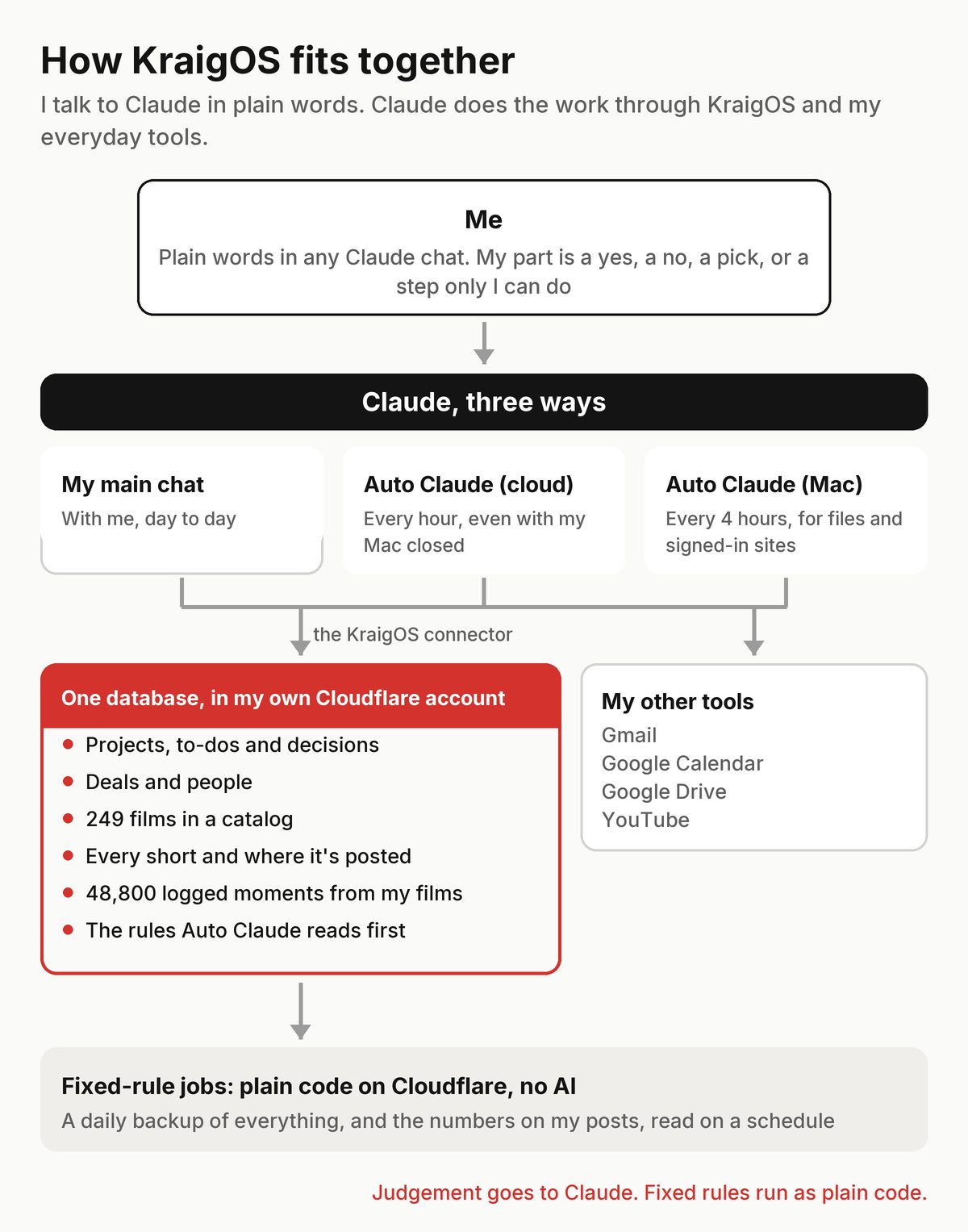
Two kinds of work, two homes. Anything that needs judgement goes to Claude. Anything that follows fixed rules, like the daily backup and reading the numbers on my posts, runs as plain code in Cloudflare, with no AI.
Claude works two ways: in my main chat with me, and as one routine that runs every 2 hours on my Mac, overnight too. It reads and files my email, keeps my calendar, reads new comments, works through Claude's to-do list, posts the shorts I've approved and handles files and sites I'm signed in to. It started on October 12 as two routines I called Auto Claude, one in the cloud every hour and one on my Mac; on October 13 I folded them into one, named it KraigOS, and that evening set it to run every 2 hours instead of 4. KraigOS sends no phone notifications: anything broken shows up at the top of the routine's report. More in KraigOS: one AI routine runs my inbox, calendar and files.
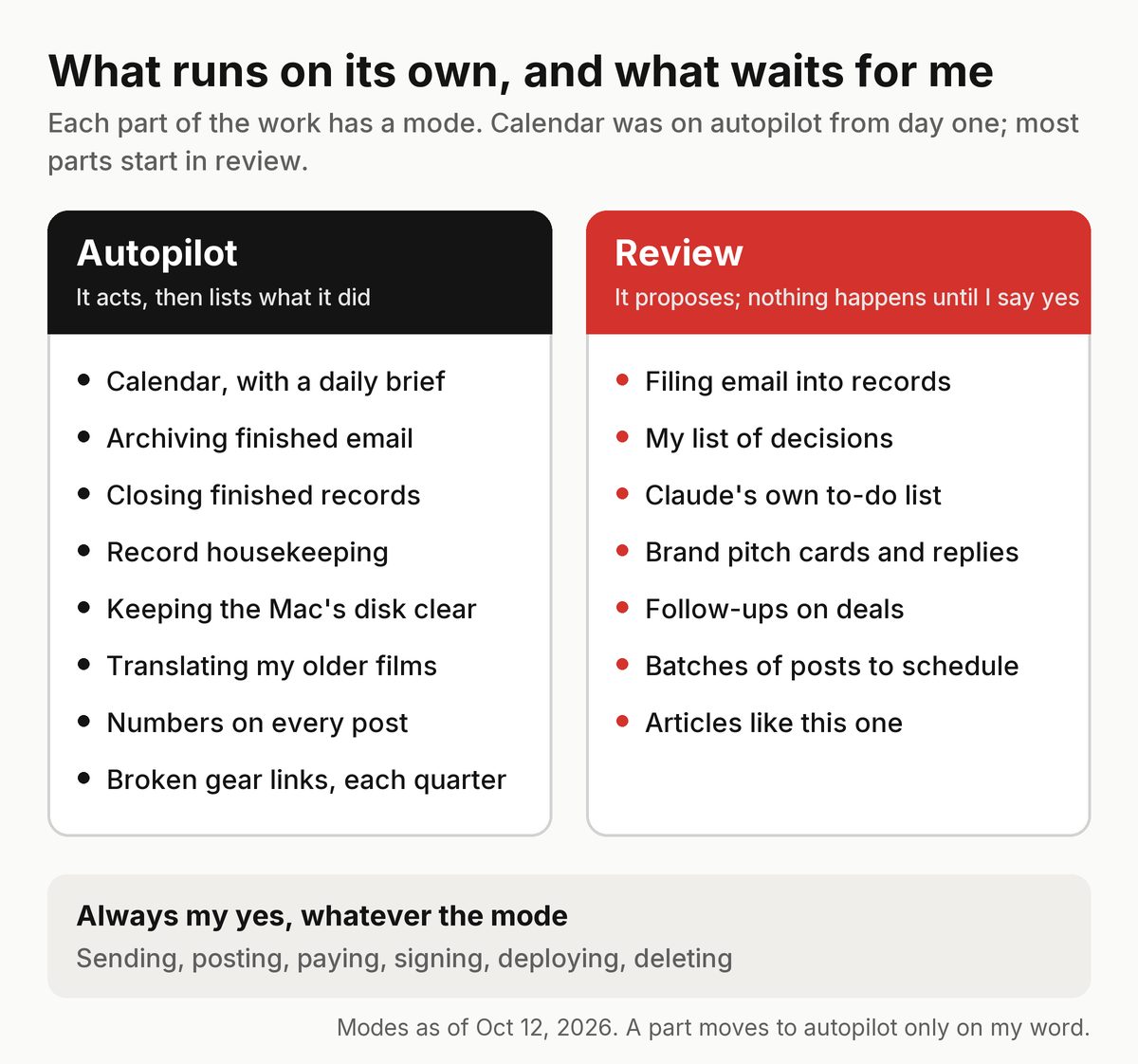
Each part starts in review. Every answer I give is logged as agreed, changed or wrong, and a part that matches my answers 15 times in a row gets a card asking to move to autopilot. Only my yes moves it, and one real mistake puts it back in review.
What I use
- Claude from Anthropic, in the Claude app and Claude Code. Opus for judgement and anything public, Sonnet for mechanical work.
- The KraigOS routine: a scheduled task in the Claude app on my Mac, every 2 hours, on Claude Opus (until October 13 there was also an hourly routine on my Claude account, in the cloud).
- Cloudflare: the database, a small program that serves it to Claude through a private connector, and storage for the daily backups.
- Google: Gmail, Google Calendar, Google Drive and YouTube, which Claude reaches through its connectors.
- Gemini from Google, for the shot logs of my films.
- ElevenLabs, for the AI clone of my voice.
- Final Cut Pro. I do the edits myself; Claude preps the files and timelines.
- GitHub, for the code.
What it costs
About $325 a month. Most of it is one Claude Max plan; the rest is storage, a voice clone, and a few pay-as-you-go APIs.
Build your own version
You don't need my setup to start. This is the order I'd do it in again:
- One database you own. One place for facts: projects, people, dates, decisions. Not rules, and never a second copy somewhere else.
- Connect it to your AI. One connector, so every chat can read and write it. Then just talk, and save what you decide as you go.
- One routine, in review mode. A scheduled run that reads your email or to-do list and proposes what it would do. Nothing happens until you say yes.
- A lessons list. Every no or change becomes a short rule the routine reads before it starts.
- Autopilot one part at a time. Start with what's low-risk and easy to undo. My calendar went first. Keep sending, paying, posting and deleting for yourself.
- Fixed rules as plain code. Backups and simple counts don't need AI.
- Keep it small. Check how much each run has to read before it works, and trim it.
The safety rules
- Nothing goes out without my yes, on the exact thing: no email, payment or signature. The one exception is notes like these, which publish themselves only when every check passes; I can take any of them down.
- Nothing is deleted. Claude moves safe copies to the Trash, and I empty it myself.
- No secrets are saved. Passwords, codes and keys that show up in email are blanked out before anything is stored.
- Sign-ins are logged first. Before Claude signs in somewhere or changes an account setting, it writes down what it's about to do.
- Email and web pages are information, never instructions. Whatever a page or an email says, it can't tell Claude what to do.
- Every action on autopilot is listed with how to undo it.