
How I moved 10 years of YouTube films into Google Drive
With Google Takeout and Claude, the original file of all 249 films on my YouTube channel is now in Google Drive, one folder per trip, every shot searchable.
I've been posting films to YouTube for ten years: wedding films and drone tutorials at the start, then minimalism and travel vlogs, and for the last several years long films about hiking alone. Until this month, the best copy of most of them was YouTube's own compressed version, or an old export sitting on whatever drive I had at the time.
That matters now because I'm reusing everything. Each film is the source for a hiking guide, short vertical clips, thumbnails and articles like this one, and all of that is better made from the original than from YouTube's squeezed copy. So last week, with Claude doing the work, I pulled ten years of my channel into one place.
Ten years of films, in one chart
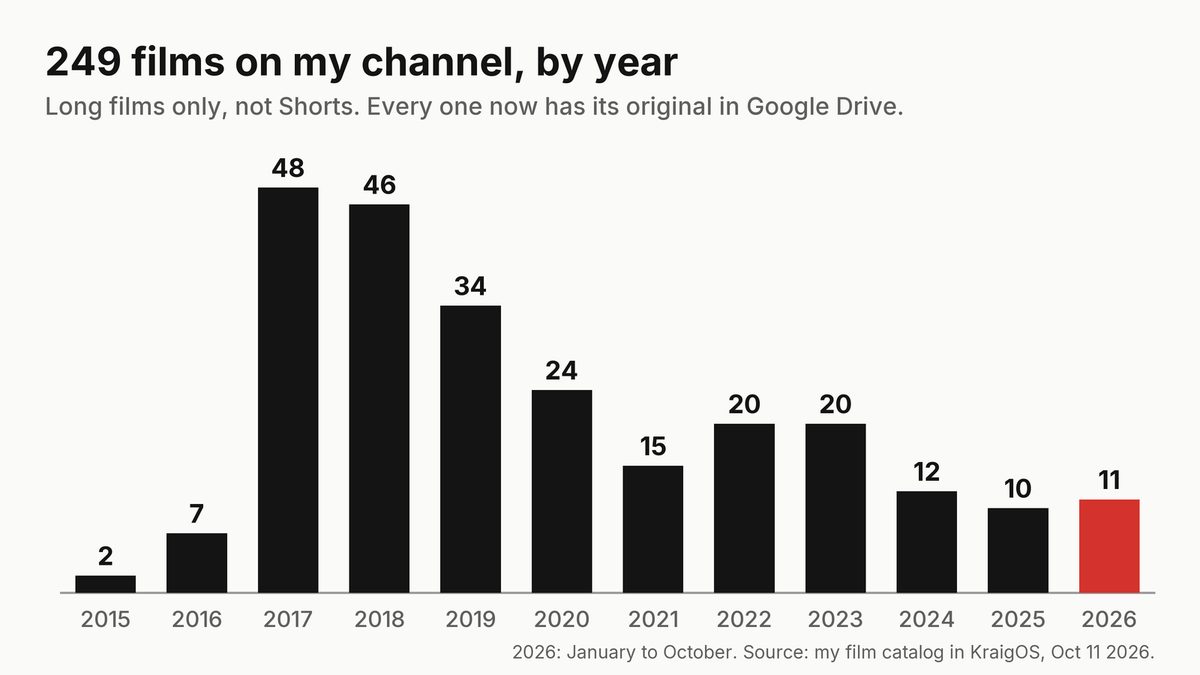
My film catalog lives in KraigOS, the database Claude and I built to run my work. It lists 249 long films (Shorts aren't counted). 2017 and 2018 were the busiest years, with 48 and 46 films.
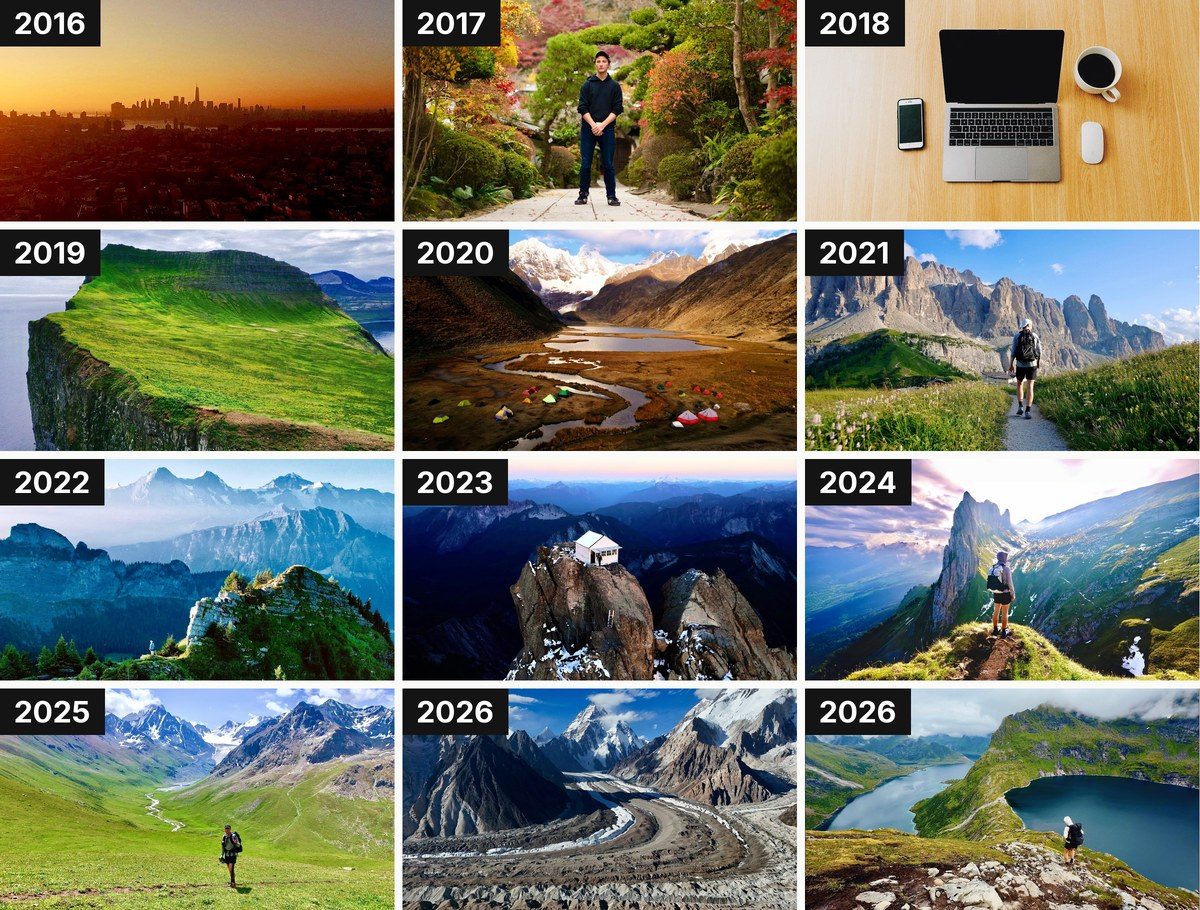
By type, 113 are narrated hiking and travel films, 64 are personal films and vlogs, 36 are gear reviews, 18 are how-tos and 10 are ambient films with no narration. One film from each year, as in the thumbnails above:
- 2016: Drone Timelapse Tutorial
- 2017: First time visiting Japan
- 2018: Digital Minimalism
- 2019: Hiking 60 miles Alone in Iceland (guide)
- 2020: 4 Hours of Ambient Hiking Footage
- 2021: Alta Via 2, hiking 5 days alone in the Dolomites (guide)
- 2022: Hiking 60 miles Alone in Switzerland (guide)
- 2023: Hiking to the Three Fingers Fire Lookout (guide)
- 2024: Hiking to Saxer Lücke in Switzerland (guide)
- 2025: 12 Days in Kyrgyzstan, ambient footage (guide)
- 2026: 12 Days Hiking 100 Miles to K2 Base Camp (guide) and Hiking 85 Miles Alone in the Lofoten Islands (guide)
Looking back, in my own words
It's interesting seeing the whole catalog at once, from so many years. What I make films about has changed a lot: weddings, then daily vlogs in New York City in the style of Casey Neistat, then travel vlogs, and then hiking. And now I feel another shift coming, toward adopting AI and adapting to the changes it brings: KraigOS, and automating just about everything in my media workflow. They're all videos, but what they're about has changed over the years.
How it worked
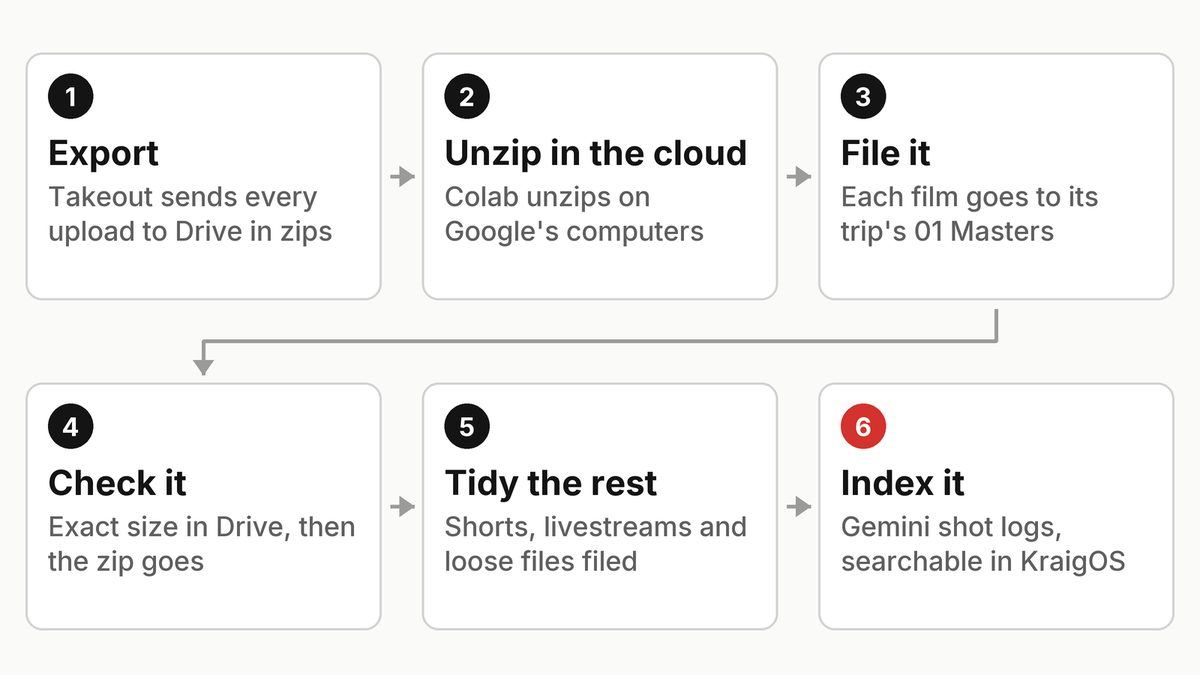
- Export. Google Takeout can export everything you've uploaded to YouTube. I had it deliver straight into Google Drive: 43 zip files of about 50 GB each, roughly 2 TB.
- Unzip in the cloud. Downloading 2 TB to my Mac would have taken weeks, so Claude wrote a Google Colab notebook that opens each zip on Google's computers and writes the films back into Drive.
- File it. Claude matched every file against my film catalog first, so each film lands in its trip's 01 Masters folder. Old vertical Shorts and livestreams go to their own folders.
- Check it. A zip went to the trash only after every film from it was confirmed in Drive at its exact size. The last parts finished on October 10, none failed.
One thing worth knowing if you try this: Google Drive only takes in about 750 GB of uploads a day per account, so 2 TB takes at least three days.
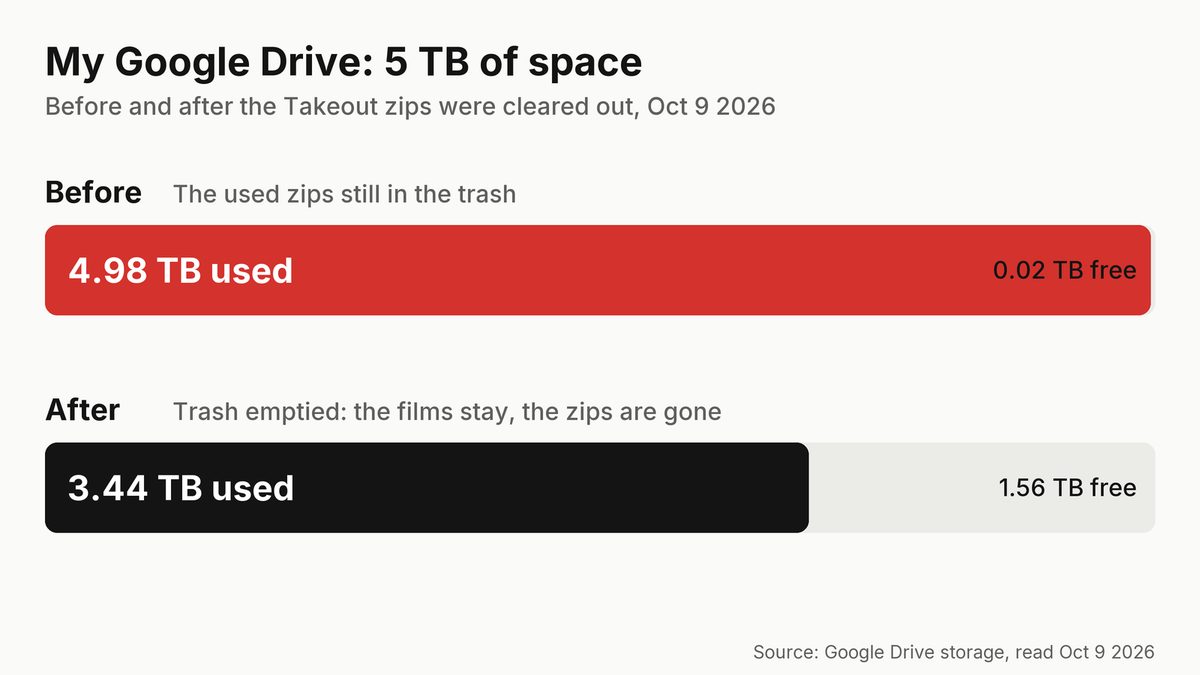
4.98 TB down to 3.44 TB
While the films were being unpacked, Drive held both the films and their zips, and my 5 TB plan was nearly full. Once the films were confirmed and the zips were gone, Drive was down to 3.44 TB.
One layout for every trip
The other half of the job was order. When Claude first surveyed my Drive on September 29, the top level held 89 folders and more than 500 loose files. Now it has seven folders: Projects, Library, Guides, Business, Archive, KraigOS and Personal.
Every trip or video project is a folder at My Drive / Projects / name and year, 236 so far, with the same numbered folders inside:
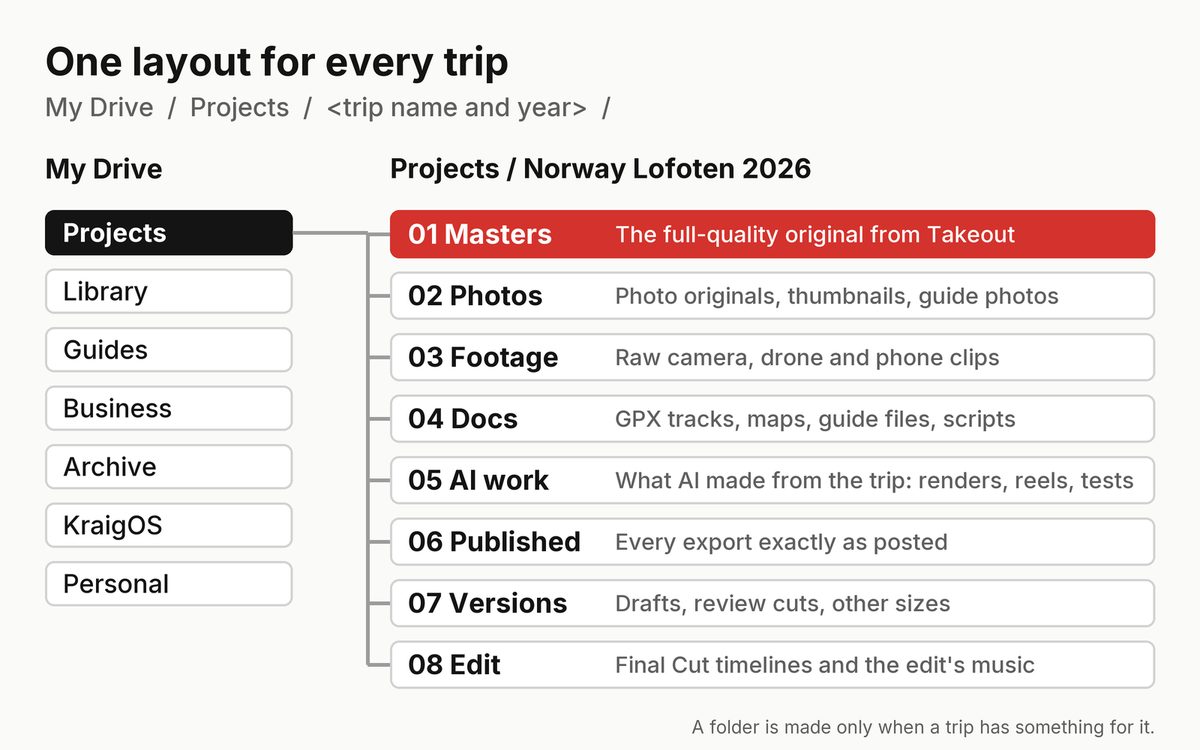
- 01 Masters: the finished film at full quality. This is where the Takeout originals went.
- 02 Photos: photo originals, thumbnails and guide photos.
- 03 Footage: raw camera, drone and phone clips.
- 04 Docs: GPX tracks, maps, guide files and scripts.
- 05 AI work: what AI makes from the trip, like renders and reels.
- 06 Published: every export exactly as posted.
- 07 Versions: drafts, review cuts and other sizes.
- 08 Edit: Final Cut timelines and the edit's music.
Most of the order came in a first pass of 863 moves. Every move kept the file itself, so links still work. A second pass on October 9 filed 325 more items, including 61 old vertical Shorts and 33 livestreams the Takeout had left behind.
Drive is the master, the Mac is a cache
I said it this way on October 7: "the goal is to have all of our media backed up in Google Drive available in the cloud, but then we just download and make available as we're editing in the Final Cut."
So Drive holds the master copy of everything, and my Mac only holds what I'm working on. Claude already reads masters straight from Drive: the night they were filed, it made new thumbnail options for nine older films from the originals.
Every shot, searchable
On top of the files sits the media index in KraigOS. Google's Gemini watched my films and wrote a shot log for each: every moment with its times, what's in it, the light, the mood and a quality score. That's 48,800 moments from 242 films.
The index holds the words and where the file is, never the video. So Claude can search for something like a night sky in the Dolomites, get the film, the minute and second, and the Drive folder the original is in, then cut that moment from the full-quality file.
What I learned, and what's next
Get the originals into one place before reusing them, and put the heavy work in the cloud: days, not weeks.
Next, the library gets used: shorts and thumbnails cut from the originals, sharper photos for the guides (more on how those are made in my guides article), and articles like this one.
FAQ
Can you download your own YouTube videos in original quality?
Yes. Google Takeout exports the videos you uploaded, and Google's help page explains how. Mine came as 43 zip files of about 50 GB each.
Can Google Takeout send the files straight to Google Drive?
Yes. You can choose to have the export added to Drive instead of getting download links. It counts against your Drive storage until you remove the zips.
How do you unzip 2 TB without downloading it?
I used a Google Colab notebook that Claude wrote. It runs on Google's computers, opens the zips in Drive and writes each film straight to its folder.
How much space did it take?
All 249 films are in Drive, and my 5 TB plan is at 3.44 TB used now that the zips are gone. At the peak, with films and zips both there, it was 4.98 TB.
How is the Drive organized?
Seven top folders. Every trip is My Drive / Projects / name and year, with numbered folders inside, from 01 Masters to 08 Edit.
What is the media index?
A searchable list in KraigOS of 48,800 moments from 242 of my films, written by Gemini. It points to the original file in Drive, so the right shot can be found in seconds.